
Passkeys are another method of login, similar to using an email and password, but even more secure — a passkey is not something you remember, but something you have. When you use a passkey to log in, you can use, for example, your fingerprint, Face ID, or a code generated by your authenticator app. To use passkeys, you need an authenticator and a secure location where the passkey is stored. This authenticator is either embedded in your operating system (e.g., Windows Hello on your Windows PC or Apple Keychain on your Apple device), part of your browser (e.g., Google Password Manager in Google Chrome), or a third-party password manager (e.g., 1Password or LastPass).
FAQ Categories
Glossary
- About Axiory
- Axiory.ai
- Bonus Stabiliser
- Account Management
- Axiory Premier Club
- Loyalty Program
- Summer Bonus Campaign 2026
- Walletory
- CFD Products
- Customer Support
- Deposits & Withdrawals
- Frequently Asked Questions
- Funding Methods & Fees
- Leverage
- MQL5 Trading Signals
- Axiory Portal
- Partnerships
- Passkey Authentication
- Trading Account Registration
- Trading Account Types
- Trading Conditions
- Trading Infrastructure
- Trading Platforms
- Trading Terms
- Trading Tools
- Wallet Account
How does Axiory's economic calendar assist traders?
Axiory provides a free economic calendar that tracks upcoming economic events and data releases. Traders can use this tool to stay informed about key events that may impact market movements, allowing for informed trading decisions.
What calculators are available when trading with Axiory?
Axiory offers free Forex calculators to help traders calculate various trade costs. These calculators include margin calculators, currency conversion calculators, pip calculators, swap calculators, and profit calculators. They are essential for managing risk and planning trades effectively.
What custom indicators does Axiory offer for MT4?
Axiory supports MT4 custom indicators, allowing traders to enhance their technical analysis capabilities. Traders can create their own custom indicators or choose from Axiory’s library of pre-existing indicators to suit their trading strategies.
What is the Strike Indicator offered by Axiory?
The Strike Indicator is a sophisticated mathematical tool designed to identify the beginning of market trends. This tool helps traders anticipate market movements early, providing a potential advantage over other traders in identifying profitable trading opportunities.
How can I prevent my account from becoming dormant?
To prevent your account from becoming dormant, ensure you maintain trading activity on your preferred trading platform (MT4, MT5, or cTrader). Regularly logging in to your Axiory portal and making deposits, withdrawals, or placing trades will keep your account active.
Are there any deposit fees when funding my Axiory account?
As part of a limited-time promotion* celebrating the launch of our newest features, Axiory has eliminated all deposit fees. This means every amount you deposit goes directly into your trading account without incurring extra costs.
*Please note that while Axiory does not charge deposit fees, banks may apply their own fees for international wire transfers, which are beyond our control.
*Please note that while Axiory does not charge deposit fees, banks may apply their own fees for international wire transfers, which are beyond our control.
Do you accept US Clients?
No, we do not accept clients who are US citizens and residents.
Can I have multiple trading accounts?
Yes, you can have multiple different trading accounts within your client profile. Each person can have up to 10 real accounts. If you wish to open more than 10 accounts, your application will be reviewed individually.
What is the Axiory dormant program?
The Axiory dormant account program is designed to manage inactive accounts and inform clients about their inactivity status. Inactive clients receive a series of newsletters reminding them to activate or reactivate their accounts within a specific timeframe to prevent account deactivation.
Can I create a wallet account during the demo stage?
Wallet accounts cannot be created during the demo stage. You can create one by upgrading to the Light or Full stage.
I have deposited but the funds are still not credited to my account, why?
Most probably there was an issue with verifying the sender of these funds. Once we have reviewed this situation we will contact you via email to inform you of the situation and any possible further steps to take.
Can I deposit and withdraw funds from US domestic banks and credit/debit cards?
We cannot accept deposits or withdrawals from credit/debit cards or banks issued in countries where we do not currently provide service, including the United States.
Is there a limit on leverage based on account balance?
Leverage limits are based on equity across all of your accounts, not account balance, to protect against market fluctuations. You can check all leverage limits here: https://www.axiory.com/trading-conditions/leverage.
Are there any restrictions on using Expert Advisors (EA)?
There are no restrictions; Expert Advisors (EAs) can be used freely. However, we don’t provide support for EAs, any issues faced must be checked with the EA developer.
How do I view historical charts in MT5?
You can view historical charts by pressing the "Home" key on your keyboard or by scrolling left to right on the chart. Make sure to turn off auto-scrolling when viewing past charts.
Alternatively, you can also download historical data from our website (selected symbols): https://www.axiory.com/trading-tools/metatrader-historical-data .
Alternatively, you can also download historical data from our website (selected symbols): https://www.axiory.com/trading-tools/metatrader-historical-data .
Is Axiory a regulated broker?
Yes, Axiory Global is regulated by the Financial Services Commission of Belize (FSC), under License No. 000122/29. For more information, please visit our website: https://www.axiory.com/why-axiory/license.
Tradit Ltd is regulated and authorised by and under the strict supervision of the FSC, license No. GB21026376.
Both entities are owned by brand name “Axiory Global Limited”.
Tradit Ltd is regulated and authorised by and under the strict supervision of the FSC, license No. GB21026376.
Both entities are owned by brand name “Axiory Global Limited”.
Do you provide phone support?
No, we do not offer customer support over the phone. For assistance, please contact us through our live chat, by email at support@axiory.com, or fill in the relevant contact form.
Do you have slippage?
Axiory aims to provide clients with the best platform bridging pricing available and to get all orders filled at the requested rate. However, there are times when, due to an increase in volatility or volume, orders may be subject to slippage. This most commonly occurs during fundamental news events.
The volatility in the market may create conditions where orders are difficult to execute, since the price might be many pips away due to the extreme market movement. Although the trader is looking to execute at a certain price, the market may have moved significantly and the order filled at the next best price or the fairest market value. Similarly, increased volume may also result in slippage if sufficient liquidity does not exist to execute all trades at the requested rate.
More information about trading execution risks can be found here:
https://www.axiory.com/assets/doc/Trading_Execution_Risks.pdf
The volatility in the market may create conditions where orders are difficult to execute, since the price might be many pips away due to the extreme market movement. Although the trader is looking to execute at a certain price, the market may have moved significantly and the order filled at the next best price or the fairest market value. Similarly, increased volume may also result in slippage if sufficient liquidity does not exist to execute all trades at the requested rate.
More information about trading execution risks can be found here:
https://www.axiory.com/assets/doc/Trading_Execution_Risks.pdf
Are there restrictions on the number of CFDs I can trade simultaneously?
Generally, there are no specific restrictions on the number of CFD positions a trader can hold simultaneously. However, margin requirements, available funds, and risk management practices should be considered when managing multiple positions.
Are there bonuses available for referring partners or new traders to Axiory?
Yes, partners can earn bonuses for referring both traders and new partners to Axiory. Benefit from bonuses tailored to reward successful referrals and build a network of sub-affiliates and introducing brokers.
I subscribed to a signal with real-time subscription enabled, but nothing happened. Why?
If the signal provider isn't actively trading, updates won't occur for subscribers. Ensure the provider is actively trading to receive real-time updates on your subscribed signal.
Are there any accounts excluded from this campaign?
Yes, the Alpha account type is excluded from the Axiory Spring Cashback Campaign and is not eligible for cashback rewards.
Can I use the same passkey on multiple devices, such as a PC and a smartphone?
Yes, passkeys can be synced across devices, especially when they are from the same manufacturer (e.g., Apple or Windows) or when you use a password manager.
Is any action required from clients to remain in the Premier Club?
No. Once selected, clients remain members unless they choose to opt out. There is no payment required, and you do not need to take any action on your part.
If stop-out occurs, will the credit bonus be deducted?
Yes. If you have active credit bonus, the amount equivalent to your negative balance will be deducted from it.
Can I receive the credit bonus in a cTrader trading account?
The credit bonus can only be received in an MT4 or MT5 trading account.
Can I trade Happy Hours on a Demo account?
No. Happy Hours are only available on Live Zero Accounts to ensure traders are accessing real-market liquidity.
Are back-testing and simulation results accurate?
Back-testing and simulations can be useful tools for exploring how a strategy might perform.
However, they are based on historical or hypothetical data. This means they do not reflect real trading conditions and cannot guarantee future results.
Can I still use my credit bonus after withdrawing my balance?
When making a withdrawal from an account with a credit bonus, a portion of the credit bonus will be written off proportionally to the withdrawal amount.
Can I transfer credit bonuses between accounts?
When transferring balances between accounts, credit bonuses will also be transferred proportionally to the amount moved. Please note that it may take some time for the inter-account transfer to be reflected. If you have positions open during credit bonus transfers, please be aware that stop-out may be triggered depending on your available margin balance. If the transfer is to an Alpha account, the credit bonus will be proportionally removed.
*In situations where there isn’t sufficient active credit to perform the proportional credit transfer, your active credit might fluctuate as the system adjusts the credit amount accordingly to perform the transfer operation without delay.
Are deposits via Walletory instant?
While most deposits are processed near-instantly, please note that your first deposit may take up to 1-2 business days to process, as verification of the provided wallet details has to take place. Any subsequent deposits should typically be reflected in your account immediately after the transaction is confirmed.
Can trading activity on one account affect my bonus credit on another account?
No. Each trading account’s bonus credit and Stability Score are managed separately. Activity on one account does not affect another.
Can I add the balance I’ve exchanged to my wallet account?
Yes, when exchanging points for a balance, you can select your wallet account as the destination in addition to your trading account.
Can I change my mind after exchanging?
No. Once you confirm, trading credit and cash cannot be changed back into points.
Because the exchange happens instantly, please check the amount before you confirm.
A swap discount is different — it can be returned if you decide you do not need it. See “Can I get my points back if I don’t need it?”.
How can I check my Stability Score?
You can always view your Stability Score in the Axiory portal under the Account detail section.
Can I withdraw my bonus credit?
No. Bonus credit cannot be withdrawn or converted into a balance. When you make a withdrawal from an account that holds a credit bonus, a proportional amount of the bonus will be deducted based on the withdrawal amount.
Are there fees for using Walletory?
A standard small transaction fee applies to all payment methods (including Walletory) for smaller amounts:
- Withdrawals under 200 USD/EUR: A fee of 10 USD/EUR applies.
- Transactions above these amounts are free of Axiory service fees.
Can I transfer credit bonuses between accounts?
When transferring balances between accounts, credit bonuses will also be transferred proportionally to the amount moved. Please note that it may take some time for the inter-account transfer to be reflected. If you have positions open during credit bonus transfers, please be aware that stop-out may be triggered depending on your available margin balance. If the transfer is to an Alpha account, the credit bonus will be proportionally removed.
*In situations where there isn’t sufficient active credit to perform the proportional credit transfer, your active credit might fluctuate as the system is adjusting the credit amount accordingly to perform the transfer operation without delay.
Can Axiory.ai execute trades or manage my account automatically?
No, Axiory.ai does not execute trades or manage your account. You remain fully in control at all times, and any action in your account only takes place with your direct approval.
How are commissions calculated on cTrader?
On cTrader, commissions are calculated at both the opening and closing of a trade. To qualify for the campaign rate, both the opening and closing of the order must occur within the Happy Zero Hour window.
- Open and Close within Happy Zero Hour: 1.24 USD total commission.
- Open or Close within Happy Zero Hour (one side only): 0.62 USD for the qualifying side.
Important Note: If you open a trade during the campaign but close it after the window ends, the standard commission rate will apply to the closing side of the trade.
I would like to participate in the campaign, so please send me an invitation email.
Invitations for this campaign are sent automatically by our system to eligible clients based on criteria set by our company. We are unable to send individual invitations and appreciate your understanding.
Can clients opt out of the Premier Club?
Yes. Clients can request removal from the club at any time by contacting Axiory’s support team at support@axioy.com.
Can I still use my credit bonus after withdrawing my balance?
When making a withdrawal from an account with a credit bonus, a portion of the credit bonus will be written off proportionally to the withdrawal amount.
What is the recommended environment for passkey authentication?
Passkeys are supported on the following operating systems: Android 9+, Chrome OS 129+, iOS/iPadOS 16+, macOS 13+, and Windows 10+. In general, any device purchased within the last 3–5 years and kept up to date should be supported.
Can I complete multiple quests at once?
Yes, you can complete multiple quests simultaneously as long as the conditions for each quest are met. For example, opening and closing trades can count towards both the "First Trades" and "Explore Currency Pairs" quests.
How are payments handled in Axiory's partner programs?
Axiory guarantees timely payments to partners, ensuring transparency and reliability in all financial transactions. Payments are structured based on flexible and competitive rebate plans designed to fit partner needs.
Are there any free signals available?
Currently, MetaQuotes offers only paid signals, which means there are no free signals available.
Can I short sell CFDs?
Yes, CFDs allow traders to profit from both rising and falling prices. Short selling CFDs involves selling an asset that the trader does not own with the aim of buying it back at a lower price, thereby profiting from a price decline.
How does Negative Balance Protection work?
Negative balance protection is one of our risk management features which serves as a precautionary measure preventing our clients from losing more money than they deposited. Should clients’ trades result in negative balance, it is then reset to 0.
How can I contact support outside of live chat hours?
If live chat is unavailable or outside of business hours, please contact us using our inquiry form available here.
How are client assets managed?
Regardless of the type of account, customer funds are managed separately from our company's funds at a trustee bank. Funds received from customers via credit card payment agencies or other collection agencies are first deposited into our corporate account and then transferred to a trust account for safekeeping.
Can I change the time displayed in MT5 and MT4?
No, the time displayed in MT5 and MT4 is London standard time (GMT+2 during winter time and GMT+3 during daylight saving time ‘summer time’).
Are there margin call restrictions?
No, margin call rules do not apply.
Can I use the Top Leverage feature on demo accounts?
Yes, it mirrors live account functionality.
Can I deposit/withdraw via Cryptocurrencies?
No, we don’t offer any crypto payment options at the moment. If crypto payments become available, we will inform you by email.
How can I deposit funds?
- Go to the Axiory portal.
- Log in and click the DEPOSIT button.
- Choose your preferred payment option and follow the provided instructions.
Can I reactivate my trading account?
Yes, you can. If you wish to reactivate your account after cancellation, please follow these instructions:
- Log in to your Axiory portal (https://my.axiory.com/).
- Click on the “Reactivation” button in the top right corner of the page.
- Upload your updated documents if needed.
- Click the "Submit" button.
Can I have a wallet account in currencies other than USD?
Wallet accounts can only be opened in USD. Find out more information here.
I want to register a Company account, what should I do?
Please head to https://www.axiory.com/register/corporate to register as a corporate client.
During the registration process you will be required to provide us with the following documents:
- Certificate of Incorporation
- Memorandum / Articles of Association
- Certificate of Registered Office
- Certificate of Registered Shareholders
- Certificate of Directors
- Resolution of the Board of Directors for opening the account
- Proof of Identity for all directors, shareholders (above 20%) and beneficial owners
- Selfie (a real-time photo) from each director in order to perform face similarity checks
Are there any asset classes excluded from the Zero spread account?
Yes, the Zero account is exclusively for forex trading. It does not cover indices, CFD stocks, or metals, including XAUUSD, allowing you to focus solely on forex pairs.
How will this affect my trading accounts?
With this change, the maximum leverage available to you may increase or decrease depending on the total equity across all your accounts (including credit / excluding Wallet and Alpha accounts). If you have multiple accounts, each account's leverage will automatically adjust to ensure compliance with the new aggregate equity-based limits.
How does Axiory achieve such fast execution times?
Axiory leverages advanced infrastructure and a cross-connected private network that is directly linked to local liquidity providers located in Equinix LD4 and TY3 data centers. This strategic connection allows us to significantly reduce latency, resulting in lightning-fast execution speeds. By minimizing delays, we enable traders to execute their strategies with precision, which is essential for capitalizing on market opportunities.
How fast is trade execution with Axiory’s upgraded infrastructure?
At Axiory, we have achieved latency levels between 0.0003 and 0.0007 seconds through our cutting-edge infrastructure (measured between Axiory and our liquidity provider’s servers). Since the network delay is greatly reduced, this significantly enhances your trading experience by allowing for near-instantaneous trade execution, which is critical in fast-paced markets. With an average execution time of just 29 milliseconds*—an improvement of 530% from the previous average of 160 milliseconds—you gain a competitive edge by being able to react to market changes more swiftly than ever.
*29 ms execution speed applies to Forex and metals only.
What is changing regarding maximum leverage settings?
Previously, the maximum leverage was determined individually for each trading account based on its usable total equity. Moving forward, the maximum leverage will be calculated based on the total equity across all your live accounts combined, including credit but excluding Wallet and Alpha accounts. You can find the specific changes in the maximum total equity and maximum leverage settings in the provided table.
| MAX Account
|
Nano/Standard Account | Maximum allowed equity with credit (USD/EUR trading accounts) |
| 1:2000 | 1:1000 | 0 – 500 USD/EUR |
| 1:2000 | 1:1000 | 501 – 2,000 USD/EUR |
| 1:1000 |
1:1000
|
2,001 – 3,333 USD/EUR
|
| 1:800 | 1:800 | 3,334 – 4,666 USD/EUR |
| 1:600 | 1:600 | 4,667 – 10,000 USD/EUR |
| 1:500 | 1:500 | 10,001 – 50,000 USD/EUR |
| 1:400 |
1:400
|
50,001 – 100,000 USD/EUR
|
| 1:300 |
1:300
|
100,001 – 200,000 USD/EUR |
| 1:200 |
1:200
|
200,001 – 300,000 USD/EUR |
| 1:100 |
1:100
|
300,001 – 500,000 USD/EUR
|
| 1:50 |
1:50
|
> 500,001 USD/EUR
|
If there is an error with my ID or selfie, how can I register additional documents?
If there's an error with your ID or selfie, you can attempt to upload the documents up to three times. After three failed attempts, a 'Submit for manual verification' button will appear. Click on it, and our verification team will review your documents manually.
Are there any conditions for zero spreads?
While we aim to provide zero spreads for the majority of the day, it’s important to understand that achieving zero spreads 100% of the time is not always feasible. We have collaborated with our liquidity provider to create conditions that target zero spreads for about 90% of the trading day. However, during certain market events, like major economic news or high volatility, spreads may naturally widen.
Most ticks will display zero spreads, but there may be instances where you see spreads of 1 or 2. Additionally, no liquidity adjustments occur during the rollover period from 23:00 to 01:00 server time. Although we strive to maintain zero spreads as much as possible, we cannot guarantee this under all market conditions.
Can I have multiple wallet accounts?
You can only have one wallet account.
How can I get my trading report?
To generate a trading report from your MT4/MT5 account please log in to the trading platform and right-click on the “Account history”, set the time period and click on “Save report”.
To receive a trading report for cTrader platform, please contact our support team at support@axiory.com.
To receive a trading report for cTrader platform, please contact our support team at support@axiory.com.
How can I cancel a pending request?
To cancel a pending request, please reach out to our customer support team at support@axiory.com.
How do I activate 2FA for withdrawals?
In the Axiory portal, this function is disabled by default. To enable it, navigate to ‘Profile and Settings’, set ‘Withdrawal authentication via email’ to ‘Activated’ and save the change. That’s it, the function is now active!
Can I transfer funds between accounts with different base currencies?
Yes, transfers between accounts with different base currencies are possible. For transfers under 10,000 USD, a fee of 1% will be deducted based on the current FX rate.
Example: Transferring 100 USD from a USD account to an EUR account results in 99 USD being transferred to the EUR account after a 1% fee.
For transfers of 10,000 USD or more, fees are structured as follows:
- 0.75% for transfers up to 50,000 USD
- 0.50% for transfers up to 100,000 USD
- 0.20% for transfers up to 500,000 USD
- 0.10% for transfers up to 1,000,000 USD
- 0.05% for amounts exceeding 1,000,000 USD
Example: Transferring 100 USD from a USD account to an EUR account results in 99 USD being transferred to the EUR account after a 1% fee.
For transfers of 10,000 USD or more, fees are structured as follows:
- 0.75% for transfers up to 50,000 USD
- 0.50% for transfers up to 100,000 USD
- 0.20% for transfers up to 500,000 USD
- 0.10% for transfers up to 1,000,000 USD
- 0.05% for amounts exceeding 1,000,000 USD
Are there times when trading is not possible?
- Summer: Tuesday to Friday, 23:59 to 00:04 (GMT+3)
- Winter: Tuesday to Friday, 00:59 to 01:04 (GMT+2)
- Winter: Tuesday to Friday, 00:59 to 01:04 (GMT+2)
Can I use cTrader on my mobile device?
- Yes, you can download the cTrader mobile app from your app store.
- Log in using your account credentials (cTID and password).
- Log in using your account credentials (cTID and password).
What are the opening hours for live chat support?
Live chat support is available Monday to Friday from 9:00 to 17:00 GMT+2. If the chat is busy or outside of these hours, please use our inquiry form for assistance at https://www.axiory.com/who-we-are/contact-us.
How does Axiory ensure data security and privacy?
We employ the highest levels of data encryption and offer two-step verification for enhanced security. Regular hack-testing and proactive monitoring for phishing threats are also part of our security protocols. We encourage clients to use strong passwords and avoid sharing sensitive information. For more information, you can always review our Privacy Policy.
Do CFDs have expiration dates?
No, CFDs do not have expiration dates. Instead, any fees or costs, such as rollovers, swaps, and spreads, are treated as price adjustments. In contrast, expiration dates are relevant to futures and options trading, where positions are automatically settled upon reaching maturity.
What does “close by” mean in MT4 and MT5?
This functionality allows you to close 2 opposite positions of the same trading instrument at the same time, using only one spread.
How can I check the transaction details of the linked account?
To view transaction details for your linked account, follow these steps:
1. Access Reports:
- Navigate to Reports on your trading platform.
2. Run Trader Transactions Report:
- Select "Trader Transactions."
- Enter your account number in the PIN# field.
- Click "Run Report."
Please note:
- Ensure there are no extra spaces before or after your account number when entering it.
- Open positions will not be displayed in this report.
- Data is updated once a day, so it may not reflect the latest information instantly.
1. Access Reports:
- Navigate to Reports on your trading platform.
2. Run Trader Transactions Report:
- Select "Trader Transactions."
- Enter your account number in the PIN# field.
- Click "Run Report."
Please note:
- Ensure there are no extra spaces before or after your account number when entering it.
- Open positions will not be displayed in this report.
- Data is updated once a day, so it may not reflect the latest information instantly.
Can I participate if I have already made my First Time Deposit (FTD) but haven't started trading yet?
No, customers who registered and completed their FTD before the campaign period are not eligible to participate.
Can I become a signal provider?
Yes, you can become a signal provider. For detailed instructions and requirements, please refer to the official MQL5 Help documentation.
How do I log in with a passkey?
Once your passkey is set up, simply click “Login via passkey” instead of entering your email and password. Depending on your device, you’ll see a list of available passkeys — select the one you set up, follow the on-screen instructions, and you’ll be logged in.
Can I join the Axiory Premier Club if I don’t receive the invitation email?
No. Membership is by selection only. Clients are chosen based on internal criteria, and those who qualify will be contacted directly. More clients will be added gradually as the program expands.
Can I transfer credit bonuses between accounts?
When transferring balances between accounts, credit bonuses will also be transferred proportionally to the amount moved. Please note that it may take some time for the inter-account transfer to be reflected. If you have positions open during credit bonus transfers, please be aware that stop-out may be triggered depending on your available margin balance. If the transfer is to an Alpha account, the credit bonus will be proportionally removed.
*In situations where there isn’t sufficient active credit to perform the proportional credit transfer, your active credit might fluctuate as the system is adjusting the credit amount accordingly to perform the transfer operation without delay.
If I trade in financial instruments other than FX (currency pairs), will the condition for profit withdrawal be met?
No. Only trading in FX (currency pairs) counts toward meeting the profit withdrawal conditions. Trades in other financial instruments will not satisfy the requirement.
How are commissions calculated on MT4 and MT5?
On MT4 and MT5, the cost of the trade is calculated at the moment of opening.
Example: If you open a trade on the featured symbol during Happy Hours, you pay 1.25 USD commission, regardless of when you close the trade.
Can I rely on the platform to make trading decisions for me?
Axiory.ai is here to support you, but it does not make decisions on your behalf.
All trading decisions remain entirely your responsibility. The platform helps you explore ideas and analyse data, while your own judgment remains essential.
Can trading activity on one account affect my bonus credit on another account?
No. Each trading account’s bonus credit and Stability Score are managed separately. Activity on one account does not affect another.
Can I add more than one Walletory account?
No, only one Walletory account can be linked per person.
Can trading activity on one account affect my bonus credit on another account?
No. Each trading account’s bonus credit and Stability Score are managed separately. Activity on one account does not affect another.
What happens if the Stability Score falls below 0 or exceeds 99999?
The Stability Score ranges from 0 to 99999. If it falls below 0 due to a negative balance or exceeds 99999, it will be classified as Level 3, and the credit bonus usage rate will be set to 0%. Please keep this in mind.
By adjusting your trading activity or making a deposit or fund transfer to the relevant trading account, your Stability Score can recover, and the use of credit bonuses will automatically resume.
Does gold follow my account leverage?
Yes. Gold (XAUUSD) uses your account leverage through the standard equity tiers, up to 1:2000 on Max accounts and up to 1:1000 on all other account types.
Can I drop down a tier? When?
Yes, but only at the start of a new quarter, and only if your volume in the quarter that just ended was below your tier’s requirement.
*If your trading account includes bonus credit, the traded volume that counts is proportional to the share of your own deposited balance (your balance-to-credit ratio).
Can I get my points back if I don’t need it?
Yes. If you have not used the discount and no longer need it, you can return it.
Please note that, unlike standard points, the expiry date for these returned points is the end of the quarter following the date of cancellation.
If I still have some of my swap fee discount allowance remaining, can I convert the remainder back into points?
Yes, even after you have used part of your swap fee discount, you can cancel the remaining allowance to have it returned as points.
Please note that, unlike standard points, the expiry date for these returned points is the end of the quarter following the date of cancellation.
What is the Bonus Stabiliser, and how does it work?
As part of our commitment to maintaining a fair environment for all traders, we are once again presenting the Bonus Stabiliser. The Bonus Stabiliser helps keep our bonus structure healthy and consistent, ensuring fairness across all accounts.
At the centre of this initiative is the Stability Score, which adjusts your bonus credit based on your trading activity. This score is calculated using factors such as position size, instruments traded, and balance operations like deposits and withdrawals. As the score shifts, the portion of your bonus that remains active is automatically updated.
Each account is placed into specific Levels according to its Stability Score. These Levels determine the percentage of bonus credit that stays active. Every trading account is assessed individually, so the activity in one account will never influence the bonus credit in another.
| Levels | Stability Score (Range) | Credit (%) |
|---|---|---|
| Level 1 | 0 - 249 | 100% |
| Level 2 | 250 - 349 | 50% |
| Level 3 | 350 - 99999 | 0% |
- Level 1: The size of your held positions is kept in a healthy balance with your account funds. You have full access to your bonus credit.
- Level 2: The size of transactions has increased relative to your account's financial strength, requiring caution. Your bonus credit is temporarily limited.
- Level 3: The size of your held positions is considered too large compared to your account funds. Your bonus credit becomes temporarily inactive until your exposure decreases or you make a deposit or transfer funds between accounts.
Do I need to be trading with Axiory to enter the Weekly X Challenges?
You don't need a trading account to enter the draw, and anyone following https://x.com/Axiory/ on X can take part by using #AxiorySummerBonusCampaign2026 on that week's post. However, if you're selected as a winner, you will need a live Axiory trading account to claim your prize.
Can I link a Walletory account that is in someone else’s name?
No. To maintain account security and comply with Anti-Money Laundering (AML) policies, the name on your Walletory account must match the name on your Axiory trading account.
Do I need to be a coder to use Axiory.ai?
Not necessarily. While we provide advanced API and MCP connectivity for developers, our forthcoming Strategy Builder is designed specifically for users to create autonomous strategies using natural language (such as English, Japanese, etc.).
How can I check my Stability Score?
You can use the Stability Score Simulator available on the campaign page to see your current score and find out your Level. The simulator also shows how your score would change if you open or close positions. Additionally, your current score is always visible in the Axiory portal under the Account detail section.
How do I know which instruments will be featured?
The "Happy Hour Schedule" is updated every week. You can find the latest sessions in your Axiory portal and check your inbox for our weekly announcement.
If my balance becomes negative, will the credit bonus be deducted?
If you have no open positions and a credit bonus, an amount equal to your negative balance will be deducted from the credit bonus, and your balance will be reset to 0.
How do I register a passkey?
- First time (first device) registration
- You can either use the prompt that offers passkey setup or go to Profile and Settings and select “Add a passkey.” Depending on your device, you’ll see a list of options — choose one and follow the instructions. Once the passkey is ready, it will appear in Profile and Settings along with the date of its last use.
- Register multiple devices (second and subsequent devices)
- If your devices are synced (e.g., iPhone and Mac), you can use the same passkey across them. Otherwise, you’ll need to set up a new one (e.g., Touch ID on your iPhone and Face ID on your Windows PC). The process for adding a passkey on additional devices is the same as for the first.
Can trading activity on one account affect my bonus credit on another account?
No. Each trading account’s bonus credit and Stability Score are managed separately. Activity on one account does not affect another.
Can my Axiory Premier Club membership be suspended or revoked?
Membership may be suspended or revoked if any of the following conditions apply:
- No trading, deposit, or withdrawal activity is observed for an extended period.
- Actions that violate Axiory's Terms of Service or irregular trading patterns are detected.
For example, if I make 5 trades (including position closures) on major FX pairs, can I complete Quests 1 and 2 simultaneously?
Yes, if you make 5 trades (open and close) on major FX pairs, you can complete both Quest 1 and Quest 2 simultaneously, as each trade counts toward the completion of any quests that require opening trades.
Can I subscribe to a signal via MT4/MT5 web?
No, it is not possible to subscribe to signals directly via the MT4/MT5 web platform. Signal subscriptions must be done through the desktop versions of MT4/MT5.
How can I start earning with Axiory's partner programs?
You can start earning with Axiory's partner programs by introducing traders to Axiory. Earn recurring commissions on trades.. Learn more about our partner programs here.
What does “multiple close by” mean in MT4 and MT5?
This functionally allows you to close multiple opposite positions of the same trading instrument at the same time.
How do CFD dividends work?
When trading CFDs on stocks, holders of long positions may receive dividends equivalent to the dividends paid on the underlying stock. Conversely, holders of short positions may be required to pay the equivalent amount of dividends.
How does Axiory prioritize security for its clients?
At Axiory, your security is our number one priority. We employ measures such as segregated accounts, third-party auditing, and membership in the Financial Commission to ensure the safety of your funds and transactions. Learn more about our security measures here.
Can I use custom indicators on cTrader?
- Yes, cTrader supports custom indicators.
- You can import or develop your own indicators using the cTrader Automate (formerly cAlgo) button.
- You can import or develop your own indicators using the cTrader Automate (formerly cAlgo) button.
Can I do scalping (ultra-short-term trading)?
Yes, scalping is allowed.
How can I check the maximum leverage available for my trading account?
View maximum leverage details on your trading account's details page in the Axiory portal.
Can I transfer funds between different brokers?
No, direct deposits and withdrawals between other brokers and our company are not accepted. You must withdraw funds from your account with us and then deposit them into the other broker's account using your card or bank account.
How does the withdrawal process work with the authentication on?
Just proceed with your withdrawal request as usual. Once you input the amount you would like to withdraw from your trading account and hit the confirmation button, you will see a window instructing you what to do next.
You should receive an Axiory Withdrawal Request Confirmation email. To complete the submission of your withdrawal request, open the email and if everything checks out, finalize your request by clicking 'Confirm Withdrawal'. Your request will be submitted and processed by us within one business day as usual.
You should receive an Axiory Withdrawal Request Confirmation email. To complete the submission of your withdrawal request, open the email and if everything checks out, finalize your request by clicking 'Confirm Withdrawal'. Your request will be submitted and processed by us within one business day as usual.
How do I change my Axiory portal password?
To change your Axiory portal password, follow these steps:
1- Log in to Axiory portal
2- Go to Profile & Settings
3- Click on “Change password”
Alternatively, you can change your password without logging in, by following these steps:
1. Access the Client Zone.
- Go to the Axiory portal and log in.
2. Initiate Password Reset:
- Click on "Forgot your password?".
3. Enter Registered Email:
- Provide your registered email address to receive a password reset link.
4. Follow Email Instructions:
- Check your email for instructions on setting a new password.
- Follow the provided link and prompts to create your new password.
By following these steps, you can successfully change your Axiory portal password, even if you have forgotten it.
1- Log in to Axiory portal
2- Go to Profile & Settings
3- Click on “Change password”
Alternatively, you can change your password without logging in, by following these steps:
1. Access the Client Zone.
- Go to the Axiory portal and log in.
2. Initiate Password Reset:
- Click on "Forgot your password?".
3. Enter Registered Email:
- Provide your registered email address to receive a password reset link.
4. Follow Email Instructions:
- Check your email for instructions on setting a new password.
- Follow the provided link and prompts to create your new password.
By following these steps, you can successfully change your Axiory portal password, even if you have forgotten it.
Can I transfer only the bonus to my wallet account?
Bonuses cannot be transferred separately to a wallet account.
How do I change the balance of my demo account?
To change the balance of your demo account, follow these steps:
1. Log in to the Axiory portal:
https://my.axiory.com/login/
2. Navigate to Demo Account:
- Click the "Change Balance" button next to your Demo account.
3. Enter Deposit Amount:
- Input the desired amount you wish to deposit.
4. Complete the Process:
- Click "Change Balance" to finalize the transaction.
By following these steps, you can adjust the balance of your demo account conveniently through Axiory portal.
Can I change my account type?
It’s not possible to change the account type of an already existing account. If you require a different account type, please log in to the Axiory portal and open an additional trading account.
Can I register for a joint account?
No, it is not possible to register a joint account.
How quickly can I open a trading account with Axiory?
Opening an account with Axiory is a quick and streamlined process. Thanks to our Smart Onboarding System, you can register and start trading in less than one minute. This innovative system incorporates advanced logic and automation, eliminating unnecessary steps and allowing you to focus on what matters most—trading. Once registered, you can quickly fund your account and start taking advantage of our trading conditions.
What if I no longer wish to trade with Axiory?
If you no longer wish to trade with Axiory, please inform our support team by email at support@axiory.com. They will assist you in withdrawing any remaining funds from your account and guide you through the necessary steps to close your account.
What are zero spreads, and how do they impact my trading?
Zero spreads indicate that there is no difference between the buying and selling prices for certain trading instruments. Axiory's Zero account offers zero spreads on over 90% of the day for popular FX instruments. This feature optimizes your trading costs and allows for tighter pricing, enabling you to enter and exit trades with greater efficiency. It is essential to note that spreads may widen during significant market events or news releases, reflecting typical market behavior. Axiory strives to maintain these zero spreads as consistently as possible.
What should I do if I trade with multiple accounts or high leverage?
If you trade across multiple accounts or maintain high leverage positions, we recommend reviewing the effective margin of each trading account. You may need to adjust your leverage settings accordingly through the Axiory portal to align with the new maximum leverage based on total equity.
Can I open a demo account with the Zero account?
Yes, you can open a demo account with the Zero account. This allows you to practice trading with zero spreads in a risk-free environment before transitioning to live trading.
How can I update my documents?
You can upload the requested document through your Axiory portal: https://my.axiory.com/, or you can alternatively send them to support@axiory.com.
How do I delete my trading account?
To delete your trading account (LIVE/DEMO), follow these steps:
From a Browser:
1. Log in to the Axiory portal: Access Axiory portal on your browser.
2. Navigate to “Your Accounts”: Find the account you wish to delete and click "More actions".
3. Select "Close Account".
From a Mobile App:
1. Open Axiory Mobile App.
2. Navigate to the trading account you want to delete.
3. Tap the 3 dots button in the top right corner and choose “Close account".
From a Browser:
1. Log in to the Axiory portal: Access Axiory portal on your browser.
2. Navigate to “Your Accounts”: Find the account you wish to delete and click "More actions".
3. Select "Close Account".
From a Mobile App:
1. Open Axiory Mobile App.
2. Navigate to the trading account you want to delete.
3. Tap the 3 dots button in the top right corner and choose “Close account".
Can I use the balance in my wallet account for trading?
To use the balance in your wallet account for trading, you must transfer funds from your wallet account to your trading account through the Axiory portal.
How do I change my registered address on Axiory portal?
To change your registered address on Axiory portal, follow these steps:
On Computer:
1. Log in to Axiory portal:
- Access Axiory portal on your computer.
2. Navigate to Customer Information/Change Request:
- Click on the human icon in the top right corner of the screen.
- Select "Profile and Settings".
3. Initiate Address Change:
- Click the "Request change" button next to the address field.
- Enter the new address you wish to use and click "Submit for review".
4. Await Approval:
- Your request will be pending approval. Wait for an email confirming the completion of the change.
- Note that further change requests cannot be processed until the current request is approved.
On Mobile:
1. Log in to the Axiory App:
- Open the Axiory mobile app and log in.
2. Access Settings:
- Tap on "..." at the bottom right corner.
3. Navigate to Address Settings:
- Tap the settings icon in the top right corner of the screen.
- Tap ">" next to the current address.
4. Enter New Address and Apply:
- Enter the new address and tap "Submit for review".
- Your request will be pending approval. Wait for an email confirming the change.
- Please note, additional change requests cannot be processed until the current request is approved.
To complete the approval process, you must submit a document issued by a third party within the last three months that verifies your current address. Accepted documents include health insurance cards, utility bills, bank statements, and more (details provided in Axiory portal).
For instructions on using the mobile version of Axiory app, please refer to the app’s settings section.
On Computer:
1. Log in to Axiory portal:
- Access Axiory portal on your computer.
2. Navigate to Customer Information/Change Request:
- Click on the human icon in the top right corner of the screen.
- Select "Profile and Settings".
3. Initiate Address Change:
- Click the "Request change" button next to the address field.
- Enter the new address you wish to use and click "Submit for review".
4. Await Approval:
- Your request will be pending approval. Wait for an email confirming the completion of the change.
- Note that further change requests cannot be processed until the current request is approved.
On Mobile:
1. Log in to the Axiory App:
- Open the Axiory mobile app and log in.
2. Access Settings:
- Tap on "..." at the bottom right corner.
3. Navigate to Address Settings:
- Tap the settings icon in the top right corner of the screen.
- Tap ">" next to the current address.
4. Enter New Address and Apply:
- Enter the new address and tap "Submit for review".
- Your request will be pending approval. Wait for an email confirming the change.
- Please note, additional change requests cannot be processed until the current request is approved.
To complete the approval process, you must submit a document issued by a third party within the last three months that verifies your current address. Accepted documents include health insurance cards, utility bills, bank statements, and more (details provided in Axiory portal).
For instructions on using the mobile version of Axiory app, please refer to the app’s settings section.
How long does the withdrawal process take?
Depending on the payment options you have chosen, most withdrawals are processed within 1 business (however, very often it only takes a few hours). Card and wire withdrawals can take up to 3-10 business days.
Can I transfer funds between different platforms (MT4/MT5, cTrader)?
You can transfer funds between different platforms (MT4/MT5, cTrader) through the Axiory portal.
How can I stop receiving emails about leverage changes?
Configure email settings via bulk leverage settings; individual account settings cannot disable notifications.
Is hedging allowed?
Yes, hedging is allowed.
How can I change my password on cTrader?
- Log in to cTrader.
- Click on your account name or profile picture.
- Select "Change Credentials" and follow the prompts to set a new password.
- Click on your account name or profile picture.
- Select "Change Credentials" and follow the prompts to set a new password.
How transparent is Axiory about its trading statistics and costs?
Axiory maintains complete transparency by providing access to trading statistics, including execution times and slippage, as well as disclosing trading costs such as spreads and swaps upfront.
What is leverage?
Leverage allows you to open bigger trading positions as this functionality multiplies your balance. Please note that while leverage does allow you to make larger profits, it can also incur more risk of larger losses.
What are the CFD spreads and swap points?
CFD spreads represent the difference between the buying (ask) and selling (bid) prices. Swap points refer to the overnight interest rate applied to positions held after market close. For detailed information on spreads and swap points for different asset classes, please check the links below:
- Stock CFDs
- Stock Index CFDs
- Energy CFDs
- Metals CFDs
- Stock CFDs
- Stock Index CFDs
- Energy CFDs
- Metals CFDs
What is the Lot Rebate Plan offered by Axiory?
The Lot Rebate Plan allows partners to earn per traded lot, along with recurring commissions. This plan is designed to provide flexible and lucrative earning opportunities for partners.
Can I use a signal with a trading account that has a smaller balance than the signal's recommended balance?
Yes, it is possible to use a signal with a smaller balance. Signals employ a proportional allocation system based on a specified percentage, factoring in currency conversion rates and leverage values of the signal. For detailed information, please refer to the official MQL5 documentation.
How are clients selected for the Axiory Premier Club?
Selection is based on internal criteria that take into account the client’s long-term activity and overall relationship with Axiory. Those who qualify are notified directly.
How can I check my Stability Score?
You can use the Stability Score Simulator available on the campaign page to see your current score and find out your Level. The simulator also shows how your score would change if you open or close positions. Additionally, your current score is always visible in the Axiory portal under the Account detail section.
How do I remove a passkey?
Go to Profile and Settings, click the three dots next to the passkey you want to remove, and select “Remove passkey.” Confirm the removal, and the passkey will be deleted immediately.
How can I track my progress and cashback eligibility in the campaign?
Once you join the campaign, you can easily track your progress and cashback eligibility through the Axiory portal Client Zone. Here’s how it works:
- Track your quests: You’ll be able to see all the quests you’re participating in and track which ones you’ve completed.
- Cashback eligibility: Your eligibility for cashback will be visible, but the exact cashback amount won’t be displayed right away. It’s calculated based on your trades throughout the campaign period.
- Final cashback amount: At the end of the campaign, we will calculate your total cashback (up to 674 USD) and send the final amount to you via email within 2 weeks after the campaign ends.
Is there a deadline to meet the withdrawal conditions?
All conditions for withdrawing profits must be completed by December 31, 2026, at 14:59 UTC.
What is the Axiory Happy Hours campaign?
During specific time periods within the campaign, the following conditions apply to Axiory’s Zero accounts (Live). This campaign is offered for a limited time only.
- Eligible Account: Zero Account (Live)
- Eligible Hours: Multiple times a week, limited to hours specified by Axiory in advance via email and in the Axiory portal.
- Eligible Trading Instruments: symbols specified by Axiory in advance via email and in the Axiory portal.
- Spread: 0.0 pips
- Trading Commissions:
-cTrader: 0.62 USD per side / 1.24 USD per lot
Important Notes:
- All trading platforms (MetaTrader 4, MetaTrader 5, cTrader) are eligible.
- Each week, different trading instruments can be announced. Therefore, trading instruments that offer zero spreads and minimized commissions one week/day may not offer zero spreads and minimized commissions the next week.
- On MT4 and MT5, clients have to open the trade during happy hours. They can close it anytime (the “cost” of the trade is calculated during opening). On cTrader, both opening and closing the trade should happen during happy hours, as commission is calculated in both instances.
- The spreads listed may widen in the event of sudden market changes (natural disasters such as earthquakes, market intervention by central banks, or other external factors), times of reduced market liquidity, or when important indicators are announced. Normal spreads will apply during times other than those listed above.
- This campaign may be changed, suspended, or terminated without notice, even during the campaign period.
- Automated trading orders are eligible for Happy Hour spreads and commissions.
If I lose my bonus through trading, can I "reload" it with another deposit?
No. Once you have reached the maximum cap for the Spring Campaign (1,000 USD), you cannot receive further credit from this specific campaign, even if your previous credit was lost during trading.
Can I use Walletory for withdrawals?
Absolutely. You can withdraw your profits back to your Walletory account. Please note that your first request may take 1–2 business days for initial processing. Also, if your total monthly withdrawals exceed certain thresholds, we may need to conduct a manual check, which could extend the processing time.
Do I stay in control of my trades?
Yes, completely. Axiory.ai is built around the principle that you approve every action before it happens. Here is how it works in practice:
- You give your AI agent an instruction, such as placing an order or closing a position.
- The agent shows you exactly what it is about to do, including the symbol, size, and order type.
- You review and confirm before anything is sent to your account.
- Only after your approval does the order execute.
No trades happen automatically or without your knowledge. You are always the final decision-maker.
How can I check my Stability Score?
Your current stability score is always visible in the Axiory portal under the Account detail section.
What is the Stability Score Simulator, and how is the score calculated?
The Stability Score Simulator is a tool you can use anytime to check how stable your trading account is. It compares your current trading exposure to your available funds, meaning the total of your available balance and available credit. Based on this, it calculates your Stability Score and places you in a specific Level, helping you understand how much bonus credit you can use and whether you should adjust your trades to stay on track.
The Stability Score is calculated using the following formula:
Stability Score = ( [CALCULATEDVOLUME] * 100 000) / ( ( [BALANCE] + [AVAILABLE CREDIT] ) * [conversion rate to USD] )
- CalculatedVolume is the total adjusted net value of your open trades. It is calculated as a sum of the open net volume of each instrument multiplied by its value rate. Please review the value rate for each instrument in the table below.
- Balance is your current account balance in your account’s currency.
- Available Credit is the bonus credit generated based on your deposit.
- Conversion Rate to USD adjusts for currency differences to ensure consistency.
| Symbol / Group | Constant |
|---|---|
| NGAS | 0.5 |
| XPTUSD | 0.5 |
| XPDUSD | 1 |
| FX (majors/minors) | 1 |
| XAGUSD | 2 |
| XAUUSD | 3 |
| EU50 | 0.1 |
| FRA40 | 0.1 |
| GER40 | 0.3 |
| HKD50 | 0.1 |
| JP225 | 0.002 |
| UK100 | 0.1 |
| US30 | 0.5 |
| US100 | 0.2 |
| US500 | 0.1 |
| UKOIL | 0.6 |
| USOIL | 0.6 |
| JP Stocks | 0.002 |
| EU Stocks | 0.002 |
| US Stocks | 0.002 |
| Clash CFD Stocks | 0.002 |
| DJCJPC | 0.5 |
| NACJPC | 0.2 |
| SPCJPC | 0.1 |
| FSLXOM | 0.002 |
| WTCXAU | 0.001 |
| JPCXAU | 0.003 |
| NACXAU | 0.3 |
| DJCXAU | 0.5 |
| COCOA | 2 |
| COFFEE.A | 0.1 |
| COFFEE.R | 11 |
| COTTON | 0.65 |
| CORN | 1 |
| LIVECATTLE | 0.5 |
| SOYBEAN | 1 |
| WHEAT | 1.25 |
| SUGAR | 0.75 |
| XALUSD | 2.5 |
| XCUUSD | 10 |
| XNIUSD | 15 |
| XPBUSD | 2 |
| XZNUSD | 3 |
Can I get points without trading?
- Welcome Points:
Points earned for actions such as opening an account or making an initial deposit. Each can be earned only once.
・Account opening: 70 points
・Completion of identity verification (KYC): 80 points
・Initial deposit: 80 points
・First trade: 70 points
*Welcome points are awarded to customers who meet each condition after the start of the program. Points are not awarded for procedures completed or trades made before the program started.
- Daily Points:
Points earned through daily logins or trading activity.
・Daily login: 1 point
・First trade of the day: 1 point
*The daily cutoff is 00:00 UTC (Coordinated Universal Time), which corresponds to 09:00 JST (Japan Standard Time) each day.
Could you explain the loyalty program’s rank structure and the requirements (transaction volume) for reaching each rank?
The program consists of five distinct ranks, and all customers begin at the "Standard" rank.
[How Rank Advancement Works]
Your rank is determined based on your cumulative transaction volume over a three-month period (one quarter).
・Standard: everyone starts here
・Silver: 500,000 USD (5 lots)
・Gold: 10,000,000 USD (100 lots)
・Platinum: 50,000,000 USD (500 lots)
・Diamond: 125,000,000 USD (1,250 lots)
If the required trading volume is reached during a quarter (3-month period), you will be upgraded to a higher rank at the moment the relevant trade is closed.
*If your trading account includes bonus credit, the traded volume that counts is proportional to the share of your own deposited balance (your balance-to-credit ratio).
How do I earn lottery tickets?
Trade eligible instruments on your live account, and tickets are credited to your account. Every ticket brings you closer to the prize. Earn lottery tickets without any limitations or maximum cap. Every traded lot on FX or standard-size CFDs on metals and selected indices counts. Refer to the table below to see how the tickets are distributed.
| Lots traded | Ticket rate |
|---|---|
| 1 to 5 lots | 1 ticket per lot |
| 6 to 20 lots | 1 ticket per 3 lots |
| 21 lots and above | 1 ticket per 5 lots |
| Eligible | Not eligible |
|---|---|
| FX | ETFs |
| CFD Metals | Real stocks |
| CFD Commodities | CFD Indices |
| CFD Energies | |
| CFD Stocks | |
| CFD Clash Indices | |
| CFD Clash Stocks |
Bonus tickets: Already won a lottery prize? A "Share your win" button will appear in your client zone. One tap posts a pre-filled message on X with #AxiorySummerBonusCampaign2026, and you'll instantly earn a bonus lottery ticket.
Why is Axiory introducing the Bonus Stabiliser?
We know how valuable a credit bonus used as margin is, and our primary goal is to be able to offer this powerful tool to all our clients consistently and for the long term. To make that possible, we needed to ensure the bonus program itself was stable and fair for everyone involved.
Think of the Bonus Stabiliser as a behind-the-scenes system that protects the health of the entire bonus program. It allows us to confidently provide a generous credit bonus to our traders, knowing the system is fair and sustainable. It’s our way of making sure this great feature is here to stay for you and our entire community.
We designed it so that for most traders, it will never be a concern and should traders face any limitations, our Bonus Stabiliser will react in real time accordingly. It simply runs in the background, ensuring a fair environment for all.
Can I use Walletory on my mobile phone?
Yes! Walletory is fully optimized for mobile use. You can request a withdrawal via the Axiory portal using any smartphone or tablet browser.
When do Happy Hours take place?
Happy Hours run multiple times per week. Specific details regarding the scheduled days and featured instruments will be announced via email and in the Axiory portal.
Does Axiory.ai provide investment advice or trading signals?
No, Axiory.ai is not an advisory service. It does not provide investment advice, trading signals, or portfolio or account management.
Instead, it generates insights automatically using AI based on your inputs and available data. These insights are designed to support your analysis and understanding of the markets, not to direct your decisions. Using Axiory.ai does not create any advisory or fiduciary relationship with Axiory.
If stop-out occurs, will the credit bonus be deducted?
Yes. If you have an active credit bonus, the amount equivalent to your negative balance will be deducted from it.
After receiving the exclusive bonus and completing a deposit, can I transfer funds to other trading accounts?
You can transfer funds to other trading accounts after completing the following steps in order:
- Step 1: Deposit 135 USD or more in a single transaction to the MT4 or MT5 trading account where you received the credit bonus. (Multiple smaller deposits totaling 135 USD will not meet this condition.)
- Step 2: After the deposit, trade 1.0 lot or more in FX currency pairs in the same trading account.
How do the Lottery draws and prizes work?
Weekly draws take place every Friday during the campaign. Each week, 10 winners receive 350 USD each from a total prize pool of 17,500 USD. The Grand Finale offers bigger prizes totaling over 24,500 USD, with one prize per winner. Tickets accumulate throughout the campaign to increase your chances in every draw.
How does my account type affect the cashback I can earn?
The cashback you earn during the campaign is based on your account type. Here's how much you can earn per trade, depending on the platform you use:
- STANDARD Account:
- MT4: 1.00 USD per lot
- cTrader: 0.50 USD per lot
- ZERO Account:
- MT4: 1.00 USD per lot
- MT5: 1.00 USD per lot
- cTrader: 0.50 USD per lot
- MAX Account:
- MT4: 4.00 USD per lot
- cTrader: 2.00 USD per lot
- NANO Account:
- MT4: 1.00 USD per lot
- cTrader: 0.50 USD per lot
- TERA Account:
- MT5: 1.00 USD per lot
- ALPHA Account:
- No cashback for this account type
What happens if I lose the smartphone on which I registered the passkey?
Your passkey will be synced to a cloud service (the service depends on your device manufacturer) - syncing is usually enabled by default. If you lose the device with the passkey and get a new one, you should be able to retrieve your passkeys, just as the rest of your data. Plus, you can always log in via your email and password combination.
How can I check if I'm an Axiory Premier Club member?
If you're a club member, a yellow icon will appear in the bonus campaign badge and in the upper right corner of the Axiory Portal, next to the profile icon.
What marketing support and resources does Axiory provide to partners?
Axiory offers comprehensive marketing support, including ready-to-go landing pages, banners, and full support for seminars and events. Partners benefit from a dedicated marketing team to maximize their outreach and success.
What is the difference between long and short CFD positions?
A long CFD position is taken when a trader expects the price of the underlying asset to rise, aiming to profit from the increase in value. In contrast, a short CFD position is taken when a trader expects the price of the underlying asset to fall, aiming to profit from the decrease in value.
Can I use one signal on multiple trading accounts?
No, each signal can only be used for one trading account. Signals cannot be shared across multiple accounts simultaneously.
What technology and platforms does Axiory offer for trading?
Axiory utilizes advanced technology with platforms like MT4, MT5, and cTrader, along with mobile trading capabilities. Our servers are strategically located in Equinix co-location centers, ensuring fast and reliable trade execution.
What is stop loss?
Stop loss is an order to close an already opened position at a price that is less profitable in order to limit the possible high loss. Once this price limit is reached, your order will be closed at the next best available price.
How can I display all currency pairs in the MT5 Market Watch and MT4 Market Watch?
To display all currency pairs:
1. Right-click within the Market Watch area.
2. Select "Show all" to display all available currency pairs.
1. Right-click within the Market Watch area.
2. Select "Show all" to display all available currency pairs.
What are the Margin call and Stop out conditions?
Margin Call: Triggered if the margin level falls below 50%, except for Max and Zero accounts where it is set at 30%.
Stop-Out Rule:
Stop-Out Rule:
- MT4/MT5: Positions are stopped out if the margin level falls below 20%.
- cTrader: Uses Smart Stop Out to maintain margin at or above 20%.
How do I change leverage for my accounts?
1. Log in to the Axiory portal.
2. Navigate to “Your accounts” then click on “More actions” then “Change leverage”
3. Choose a new leverage ratio and save changes.
2. Navigate to “Your accounts” then click on “More actions” then “Change leverage”
3. Choose a new leverage ratio and save changes.
What are the available payment options?
We’re constantly updating the available payment options for our clients. You can review the list of currently available options here: axiory.com/trading-conditions/funding-methods.
Can I transfer money from a family member's credit card or bank account?
Transfers cannot be made from a person other than the account holder of the trading account.
To prevent money laundering, the name registered with us and the name of the transferor must be the same.
To prevent money laundering, the name registered with us and the name of the transferor must be the same.
How do I change my registered email address on Axiory portal?
To change your registered email address on Axiory portal, follow these steps:
On Computer:
1. Log in to Axiory portal.
2. Navigate to Profile & Settings:
- Click on the human icon in the top right corner of the screen.
- Select "Profile and Settings".
3. Initiate Email Change:
- Click the "Request change" button next to your contact information.
- Enter the new email address you wish to use and click "Submit".
4. Await Approval:
- Your request will be pending approval. Wait for an email confirming the completion of the change.
- Please note, further change requests cannot be processed until the current request is approved.
On Mobile:
1. Log in to the Axiory App.
2. Access Settings:
- Tap on the 3 dots button at the bottom right corner.
3. Navigate to Email Settings:
- Tap the settings icon in the top right corner of the screen.
- Tap ">" next to the current email address.
4. Enter New Email and Apply:
- Enter the new email address and tap "Submit for review".
- Your request will be pending approval. Wait for an email confirming the change.
- Note that further changes cannot be made until the current request is approved.
On Computer:
1. Log in to Axiory portal.
2. Navigate to Profile & Settings:
- Click on the human icon in the top right corner of the screen.
- Select "Profile and Settings".
3. Initiate Email Change:
- Click the "Request change" button next to your contact information.
- Enter the new email address you wish to use and click "Submit".
4. Await Approval:
- Your request will be pending approval. Wait for an email confirming the completion of the change.
- Please note, further change requests cannot be processed until the current request is approved.
On Mobile:
1. Log in to the Axiory App.
2. Access Settings:
- Tap on the 3 dots button at the bottom right corner.
3. Navigate to Email Settings:
- Tap the settings icon in the top right corner of the screen.
- Tap ">" next to the current email address.
4. Enter New Email and Apply:
- Enter the new email address and tap "Submit for review".
- Your request will be pending approval. Wait for an email confirming the change.
- Note that further changes cannot be made until the current request is approved.
Is there a fee for maintaining my trading account?
Yes, there may be an account maintenance fee under certain conditions:
- Active Usage: If deposits, withdrawals, fund transfers, or transactions occur within one year, no maintenance fee is charged.
- Dormant Account: If there are no deposits, withdrawals, fund transfers, or transactions for more than one year, a monthly maintenance fee of 5 USD applies.
- Multiple Accounts: If any of your trading accounts have activity within one year, no maintenance fee will be charged on other accounts.
For more information, please contact our support team at support@axiory.com.
- Active Usage: If deposits, withdrawals, fund transfers, or transactions occur within one year, no maintenance fee is charged.
- Dormant Account: If there are no deposits, withdrawals, fund transfers, or transactions for more than one year, a monthly maintenance fee of 5 USD applies.
- Multiple Accounts: If any of your trading accounts have activity within one year, no maintenance fee will be charged on other accounts.
For more information, please contact our support team at support@axiory.com.
If I move the balance from my trading account with a bonus to my wallet account, what happens to the bonus?
When you move the balance from a trading account with a bonus to a wallet account, the bonus will also be transferred along with it.
Can I open multiple demo accounts?
It is possible to open multiple demo accounts. You can open various demo accounts according to your investment situation, such as account type, base currency (USD, EUR), and investment amount. To open a demo account, please apply from the demo account opening form.
How do I register with Axiory?
You can register for an Axiory trading account by filling out our registration form which is available at https://my.axiory.com/register.
What should I do if I want to reactivate my dormant account?
To reactivate your dormant account, you can place a trade if you have any remaining balance, alternatively, you may log in to your Axiory portal and make a deposit or a withdrawal request. Our support team is always available to help guide you through the process.
What is a "zero stop-out level," and how does it work?
A zero stop-out level means that you benefit from a larger margin buffer, providing greater flexibility in managing your trades. This feature allows you to maintain positions longer without the worry of being forced out of the market prematurely. It gives you the confidence to adjust your trading strategy as needed, particularly in volatile market conditions. This advantage is available for our Max and Zero accounts, enhancing your trading control and decision-making capabilities.
What is slippage, and how does Axiory handle it?
Slippage occurs when an order is executed at a different price than intended, usually due to market volatility. Axiory has implemented advanced technological solutions that minimize slippage, allowing for zero or positive slippage on about 70% of all trades. This means that the majority of your trades will be executed at your intended price or even better, leading to smoother and more predictable trading outcomes. This level of reliability enhances your overall trading experience and helps in managing trading costs more effectively.
Are there any fees associated with a dormant account?
Yes, a fixed fee of 5 USD/month will be charged for dormant accounts with a remaining balance. This fee will be applied every month until you reactivate your account or your balance reaches zero. If applicable, conversion rates will also be considered when charging the monthly fee.
How long does it take to register and start trading?
If you provide us with all the documentation required through our onboarding process, you should be able to start trading within 10 minutes.
When I try to open an account using my smartphone, I can't connect to the camera. How can I fix this?
To enable your camera for account setup:
For iPhone/iPad (iOS):
- Open Settings.
- Tap Chrome.
- Turn on the Camera option.
- Go to Settings > Apps > Chrome.
- Tap Permissions.
- Enable the Camera permission.
How do I change my registered phone number on Axiory portal?
To change your registered phone number on Axiory portal, follow these steps:
On Computer:
1. Log in to the Axiory portal on your computer.
2. Navigate to Profile Settings:
- Click on the human icon in the top right corner of the screen.
- Select "Profile and Settings".
3. Initiate Phone Number Change:
- Click the "Request change" button next to your contact information.
- Enter the new phone number you wish to use and click "Submit for review".
4. Await Approval:
- Your request will be pending approval. Wait for an email confirming the completion of the change.
- Note that further change requests cannot be processed until the current request is approved.
On Mobile:
1. Log in to the Axiory App:
- Open the Axiory App and log in.
2. Access Settings:
- Tap on "..." at the bottom right corner.
3. Navigate to Phone Number Settings:
- Tap the settings icon in the top right corner of the screen.
- Tap ">" next to the current phone number.
4. Enter New Phone Number and Apply:
- Enter the new phone number and tap "Submit for review".
- Your request will be pending approval. Wait for an email confirming the change.
- Please understand that further changes cannot be made until the current request is approved.
On Computer:
1. Log in to the Axiory portal on your computer.
2. Navigate to Profile Settings:
- Click on the human icon in the top right corner of the screen.
- Select "Profile and Settings".
3. Initiate Phone Number Change:
- Click the "Request change" button next to your contact information.
- Enter the new phone number you wish to use and click "Submit for review".
4. Await Approval:
- Your request will be pending approval. Wait for an email confirming the completion of the change.
- Note that further change requests cannot be processed until the current request is approved.
On Mobile:
1. Log in to the Axiory App:
- Open the Axiory App and log in.
2. Access Settings:
- Tap on "..." at the bottom right corner.
3. Navigate to Phone Number Settings:
- Tap the settings icon in the top right corner of the screen.
- Tap ">" next to the current phone number.
4. Enter New Phone Number and Apply:
- Enter the new phone number and tap "Submit for review".
- Your request will be pending approval. Wait for an email confirming the change.
- Please understand that further changes cannot be made until the current request is approved.
What are the withdrawal fees?
Withdrawal fees apply, but they vary depending on the payment methods. Please, see the following page for further details.
How do I transfer funds between trading accounts?
To transfer funds between trading accounts:
1. Log in to the Axiory portal.
2. Click on "Transfer Funds" in the top right corner of the screen.
3. Select the account you want to transfer funds from and the account you want to transfer funds to.
4. Enter the transfer amount.
5. Once you see the message "The operation was completed successfully," the transfer is complete.
Please ensure the transferred funds are reflected in both Axiory portal and your trading account. Note that transfers between accounts with different base currencies will incur an exchange rate.
1. Log in to the Axiory portal.
2. Click on "Transfer Funds" in the top right corner of the screen.
3. Select the account you want to transfer funds from and the account you want to transfer funds to.
4. Enter the transfer amount.
5. Once you see the message "The operation was completed successfully," the transfer is complete.
Please ensure the transferred funds are reflected in both Axiory portal and your trading account. Note that transfers between accounts with different base currencies will incur an exchange rate.
What is cTrader Smart Stop Out?
cTrader's Smart Stop Out is a risk management feature that minimizes losses by partially closing only the largest losing position to maintain margin levels, rather than fully closing positions, which helps protect the trader's account balance.
What is the "Top Leverage” Adjustment Mode?
This feature automatically adjusts leverage to the maximum available based on total equity across active accounts, visible in trading account details.
What is stop out?
Stop out comes into play when the margin level of your account falls below 20%. Stop out is a process that aims to decrease the margin of your account by closing positions. Which positions are closed depends on the trading platforms’ server and how it’s been programmed to work. Stop out behaves differently in trading platforms, and for sure, it works differently in MT4 and cTrader. You can find more information on stop out here: Negative Balance Protection.
How can I do demo trading with my Max account on MT4?
To conduct demo trading with your Max account on MT4, follow these steps:
- Stocks Eligible for Demo Trading: Only stocks displayed on the platform with "_max" in their name can be traded in demo mode. These stocks are specifically designated for demo trading purposes on the Max account with MT4.
- Stocks Eligible for Demo Trading: Only stocks displayed on the platform with "_max" in their name can be traded in demo mode. These stocks are specifically designated for demo trading purposes on the Max account with MT4.
Can I use paid signals on a demo account?
No, signals are not available for use on demo accounts. They are only accessible and functional on live trading accounts.
What is the leverage for CFDs?
The leverage available for CFDs varies depending on the product and broker's terms. For specific leverage details, please refer to our Leverage page. It's important to note that the leverage set when opening your account might not apply to CFD trading.
How does the Bonus Stabilizer work for Premier members?
For Premier members, the Bonus Stabilizer does not reduce their available credit. Their credit remains at 100% throughout the entire Bonus Campaign.
On which platforms can I use the bonus credit?
The bonus credit is available on MT4, MT5, and cTrader. Please note that loss coverage is only available when trading on MT4 and MT5.
What is passkey authentication?
How is trading consistency tracked for Quest 4?
For Quest 4: Trading Consistency, trades must be placed on five consecutive days. Keep in mind:
- Weekend trades do not count (Example: If you trade on the first day on Thursday, you will need to trade until the following Wednesday, excluding Saturday and Sunday.)
- Example 1: Trade for 5 consecutive days from Thursday to the following Monday → Only 3 days are counted
- Example 2: Trade from Thursday to the following Wednesday, excluding Saturday and Sunday → Counts as 5 days
- Transactions are tracked in UTC (Coordinated Universal Time).
After receiving the exclusive bonus and completing the deposit, can I transfer funds to other trading accounts?
By achieving the conditions for withdrawing profits, you will be able to transfer funds to other trading accounts.
On which platforms can I use the bonus credit?
The bonus credit is available on MT4, MT5, and cTrader. Please note that loss coverage is only available when trading on MT4 and MT5.
Which account types are eligible?
This offer is exclusive to Live Zero Accounts. Standard, Nano, Max, Alpha, and Demo accounts are not eligible for Happy Hour pricing.
How do I get access?
Axiory.ai is now live and open to everyone. There is no waitlist. Here is what you need to get started:
- An Axiory cTrader account. If you do not have one yet, create one at axiory.com. It only takes a few minutes.
- Your FIX API credentials. Once your account is active, go to cTrader Settings > FIX API to set these up. This is a separate password from your regular cTrader login.
- Your preferred AI agent. Claude, ChatGPT, Gemini, Cursor, Manus, and any other MCP-compatible agent are all supported.
Once you have those three things ready, head to mcp.axiory.ai to connect and get going. Step-by-step setup guides for every supported agent are at mcp.axiory.ai/docs/agents/choosing-an-agent/.
Do I need to verify my identity to use Walletory?
Yes. To ensure compliance with global financial regulations (KYC/AML), Walletory requires a standard verification process for registration and transaction authentication.
How do I take part in the SM challenges on X?
- Watch for our challenge post each Monday.
- Quote or reply to that post using #AxiorySummerBonusCampaign2026 before the following Friday's reveal.
That's it; your entry is then included in that week's random draw.
If you win, you will be contacted via DM on X, so make sure you have DMs enabled so we can reach you. Then, you will have to provide us with your Axiory trading account number so we can credit your prize to your chosen account.
Do I have to claim these, or are they automatic?
They are automatic. Nothing to claim, nothing to remember.
How will I know if I have won a lottery prize?
Winners will be notified directly, and prize credit will be deposited into their wallet accounts. If you do not yet have a wallet account, our team will create one on your behalf and credit your prize to it.
Do I have to sign up? Does it cost anything?
No, and no.
You are in the program automatically. There is no application form. There is no fee. Nothing is deducted from your account.
How do I link my Walletory account to Axiory?
To link your account, go to the withdrawal section in the Axiory portal and select Walletory. If no account is linked, an "Add new account" window will appear. Enter your registered Walletory email address and upload a screenshot of your Walletory profile for verification.
How do I get started with Axiory.ai?
Getting started takes just a few minutes. Here is what to do:
- Create an Axiory cTrader account at axiory.com if you do not have one already.
- Get your FIX API credentials by going to cTrader Settings > FIX API. Note: This is a separate password from your standard cTrader login, so make sure to set it up there.
- Go to mcp.axiory.ai and choose your preferred AI agent (Claude, ChatGPT, Gemini, and more are all supported).
- Enter your credentials and set your risk limits.
- Start in Paper Mode to explore and test everything risk-free before going live.
Full step-by-step guides for every supported agent are at mcp.axiory.ai/docs/agents/choosing-an-agent/. If you get stuck at any point, reach out to support@axiory.com.
Which platforms can I use?
You can enjoy Happy Hours across all Axiory platforms: MetaTrader 4, MetaTrader 5, and cTrader.
What happens if the Stability Score falls below 0 or exceeds 99999?
The Stability Score ranges from 0 to 99999. If it falls below 0 due to a negative balance or exceeds 99999, it will be classified as Level 3, and the credit bonus usage rate will be set to 0%. Please keep this in mind.
By adjusting your trading activity or making a deposit or fund transfer to the relevant trading account, your Stability Score can recover, and the use of credit bonuses will automatically resume.
Can I continue using the credit bonus even after withdrawing my balance?
- If you withdraw before meeting the conditions for profit withdrawal (deposit and 1.0 lot trade): You can withdraw the funds you deposited at any time. However, if you withdraw before meeting the conditions, all remaining credit bonuses will be deleted, and profits earned solely from the bonus will also be reset to zero.
- If you withdraw after meeting the conditions for profit withdrawal: You can freely make withdrawals. When you withdraw from an account with a credit bonus, the credit bonus will be deducted proportionally to the withdrawal amount.
How will clients know when new benefits are added?
Premier members will be informed directly via email of any updates.
Can I use signals if I have a credit bonus on my trading account?
Yes, signals can be used with accounts that have a credit bonus. Credit bonuses do not affect the balance used for signal setup but contribute to available margin for trading. Refer to the signal setup screen for specific details, including maximum margin utilization rates and margin thresholds including credit bonuses.
In Quest 4, do weekend transactions count?
No, weekend transactions do not count. (For example, if you trade on the first day on Thursday, you will need to trade until the following Wednesday, excluding Saturdays and Sundays.)
What should I do if I don’t have a device that supports facial or fingerprint authentication?
You can still use passkeys, just select the option, e.g., the code from the authenticator app. Or you can simply keep using the email and password combination.
What happens if the Stability Score falls below 0 or exceeds 99999?
The Stability Score ranges from 0 to 99999. If it falls below 0 due to a negative balance or exceeds 99999, it will be classified as Level 3, and the credit bonus usage rate will be set to 0%. Please keep this in mind.
By adjusting your trading activity or making a deposit or fund transfer to the relevant trading account, your Stability Score can recover, and the use of credit bonuses will automatically resume.
What is the leverage for gold/silver?
Gold (XAUUSD) follows your account leverage, up to 1:2000 on Max accounts and up to 1:1000 on all other account types, depending on your equity tier. Silver (XAGUSD) is not affected by this change and remains fixed at 1:100 on all account types, regardless of the leverage set when opening your account. You can check all leverage tiers here: axiory.com/trading-conditions/leverage.
What is take profit?
Take profit is an order to close an already opened position at a price that is more profitable than at the time the order has been placed. Once this price limit is reached, your order will be closed.
How can I generate trading reports for tax purposes in MT5?
To generate trading reports in MT5 for tax purposes:
1. Log in to MT5 and navigate to the "Toolbox" screen.
2. Click on the "Account History" tab.
3. Right-click within the "Account History" list and select "Report".
4. Specify the period required for your tax report.
5. Choose Excel (XML) or HTML format and save the report for tax filing.
1. Log in to MT5 and navigate to the "Toolbox" screen.
2. Click on the "Account History" tab.
3. Right-click within the "Account History" list and select "Report".
4. Specify the period required for your tax report.
5. Choose Excel (XML) or HTML format and save the report for tax filing.
How long does it take to make a deposit via credit/debit card?
Once the payment is complete, it will be reflected in your account immediately.
What is the leverage for CFDs, gold, and silver?
Leverage specifics vary; You can check all symbols’ specifications here: https://www.axiory.com/markets.
How do I log in to the Axiory portal?
To log in to Axiory portal, follow these steps:
1.
Desktop: Visit https://my.axiory.com/login/.
Mobile Version: Download the app and tap to open.
2. Enter your login information.
3. Use the registered email address and password provided in the "Axiory Portal Account Information Notification" sent to you when you opened your account.
What happens if I make a deposit in a currency other than USD?
All transactions will be converted to the base currency of your account based on the actual spot exchange rate in our bank for that day.
Do you offer cent accounts?
No, we do not offer cent accounts.
My country of residence is not eligible to open an account, what can I do?
Unfortunately in this case, and due to our Client’s Domicile Policy, you wouldn't be able to open an account with Axiory.
What happens if my account is deactivated due to dormancy?
If your account is deactivated due to dormancy, you will need to submit a reactivation request through the Axiory portal. Our team will review your request and may require additional information, such as updated KYC documents or answers to our investment questionnaire. Once your request is approved, you will become an Axiory client again, and your new trading account will be opened.
How long can my account remain inactive before it is considered dormant?
An account is considered dormant if there has been no trading activity, deposits or withdrawals for over 12 months. At this point, you will begin receiving newsletters encouraging you to activate or reactivate your account to avoid deactivation.
What are W-8BEN and W-8BEN-E forms?
W-8BEN (Individuals):
The W-8BEN form, or "Certificate of Non-Residency of Beneficial Owner for U.S. Withholding Tax," is required to certify that you are not a U.S. citizen or resident. This form exempts you from U.S. tax filings when opening an Alpha account with Axiory. Failure to submit this form will prevent you from using the Alpha account.
How to Submit W-8BEN (Individuals):
1. Log in to the Axiory portal and select the MT5 Alpha account.
2. Follow the on-screen instructions to complete and submit the W-8BEN form.
W-8BEN-E (Corporate Customers):
The W-8BEN-E form serves the same purpose as W-8BEN but is intended for corporate entities. It verifies non-U.S. residency and exempts corporations from U.S. tax obligations when adding an Axiory Alpha account.
How to Submit W-8BEN-E (Corporate Customers):
1. Contact our support team at support@axiory.com to express your intent to open an Alpha account.
2. Receive the W-8BEN-E form, fill it out using the provided sample, and return it to support@axiory.com.
3. Upon approval, you will receive confirmation to proceed with opening an Alpha account on the Axiory portal.
For detailed assistance, please contact our support team at support@axiory.com.
The W-8BEN form, or "Certificate of Non-Residency of Beneficial Owner for U.S. Withholding Tax," is required to certify that you are not a U.S. citizen or resident. This form exempts you from U.S. tax filings when opening an Alpha account with Axiory. Failure to submit this form will prevent you from using the Alpha account.
How to Submit W-8BEN (Individuals):
1. Log in to the Axiory portal and select the MT5 Alpha account.
2. Follow the on-screen instructions to complete and submit the W-8BEN form.
W-8BEN-E (Corporate Customers):
The W-8BEN-E form serves the same purpose as W-8BEN but is intended for corporate entities. It verifies non-U.S. residency and exempts corporations from U.S. tax obligations when adding an Axiory Alpha account.
How to Submit W-8BEN-E (Corporate Customers):
1. Contact our support team at support@axiory.com to express your intent to open an Alpha account.
2. Receive the W-8BEN-E form, fill it out using the provided sample, and return it to support@axiory.com.
3. Upon approval, you will receive confirmation to proceed with opening an Alpha account on the Axiory portal.
For detailed assistance, please contact our support team at support@axiory.com.
Do you offer Islamic/swap-free accounts?
Yes, we do offer islamic/swap-free accounts. To request this type of an account, please contact your dedicated account manager or our support team on support@axiory.com.
What is 2-factor withdrawal authentication and how does it work?
We take the safety of your funds just as seriously as you do. That’s why Axiory offers an extra security feature designed to make sure you are the only one who can access your money and that’s the 2-Factor Withdrawal Authentication. When turned on, each withdrawal request you make has to be confirmed by clicking a button in a verification mail sent specifically for this purpose. Unless confirmed, the request will not be submitted and your money will remain in your trading account.
How do I log in to the Autochartist mobile app using Axiory portal?
To log in to the Autochartist mobile app via Axiory portal, follow these steps:
1. Log in to the Axiory portal:
- Access Axiory portal on your desktop.
2. Navigate to QR Code for Autochartist:
- Click on the human icon in the top right corner of the screen.
- Select "Customer Information/Change Request".
3. Get QR Code:
- Click the "Show to QR code" button next to "Autochartist QR login code" to display the QR code.
4. Use Autochartist App:
- Open the Autochartist app on your smartphone.
- Tap "Log in with QR code".
5. Scan QR Code:
- Use the app's scanning feature to scan the QR code displayed on Axiory portal.
This process enables you to log into the Autochartist mobile app securely through Axiory portal on your desktop. Please note, viewing the QR code is only available on the desktop version of Axiory portal.
1. Log in to the Axiory portal:
- Access Axiory portal on your desktop.
2. Navigate to QR Code for Autochartist:
- Click on the human icon in the top right corner of the screen.
- Select "Customer Information/Change Request".
3. Get QR Code:
- Click the "Show to QR code" button next to "Autochartist QR login code" to display the QR code.
4. Use Autochartist App:
- Open the Autochartist app on your smartphone.
- Tap "Log in with QR code".
5. Scan QR Code:
- Use the app's scanning feature to scan the QR code displayed on Axiory portal.
This process enables you to log into the Autochartist mobile app securely through Axiory portal on your desktop. Please note, viewing the QR code is only available on the desktop version of Axiory portal.
How much is the fee for transferring funds?
There is no fee for transferring funds between two trading accounts of the same currency, regardless of the amount transferred.
However, when transferring funds between two trading accounts with different currencies, a conversion fee applies based on the amount transferred.
However, when transferring funds between two trading accounts with different currencies, a conversion fee applies based on the amount transferred.
How can I get a trading report for tax purposes in MT4?
To generate a trading report for tax purposes in MT4:
1. Log in to MT4 and navigate to the "Terminal" screen.
2. Click on the "Account History" tab.
3. Right-click within the "Account History" list and select "Save Detailed Report".
4. Save the report in HTML format and use it for tax filing.
1. Log in to MT4 and navigate to the "Terminal" screen.
2. Click on the "Account History" tab.
3. Right-click within the "Account History" list and select "Save Detailed Report".
4. Save the report in HTML format and use it for tax filing.
What should I do if I trade with multiple accounts or high leverage?
If you trade across multiple accounts or maintain high leverage positions, we recommend reviewing the effective margin of each trading account. You may need to adjust your leverage settings accordingly through the Axiory portal to align with the new maximum leverage based on total equity.
What is the maximum leverage you offer?
Maximum leverage we offer is 1:2000 on our Max account type.
Is there any cost associated with being a Premier Club member?
No. Membership and all associated benefits are provided at no additional cost.
What is the Axiory New Year Bonus Campaign 2026 about?
You receive a 100% bonus on every deposit you make during the campaign, up to a total of 750 USD in bonus credit. For example, if you deposit 100 USD, you’ll get an additional 100 USD in bonus credit, effectively doubling your trading power. This credit can be used as margin and to cover potential losses.*
Also, the Credit Bonus with margin functionality is back and allows you to keep trading using only your credited bonus, even if your account balance drops to zero or goes negative.
*This function is not available on cTrader.
Can I use signals if the provider uses a different broker than mine?
Yes, signals can be used with different brokers. However, differences in price and order execution may affect trade outcomes, even if stop loss and take profit levels are set. Refer to the signal setup guidelines for more details.
Is demo account trading eligible for this campaign?
No, demo account trading is not eligible for the campaign's quests or cashback rewards. Only live account trading counts.
Can I receive the credit bonus even if my trading account has a balance?
The trading account where you receive the credit bonus must have a zero balance.
What is the Axiory 15th Anniversary Spring Campaign 2026 about?
You receive a 100% bonus on every deposit you make during the campaign, up to a total of 1,000 USD in bonus credit. For example, if you deposit 500 USD, you’ll get an additional 500 USD in bonus credit, effectively doubling your trading power. This credit can be used as margin and to cover potential losses.*
Also, the Credit Bonus with margin functionality is back and allows you to keep trading using only your credited bonus, even if your account balance drops to zero or goes negative.
*This function is not available on cTrader.
Is there a way to test my AI agent before going live?
Yes. Axiory.ai has launched with a comprehensive demo environment. This allows developers and traders to test their AI agents and strategies using virtual funds in a risk-free setting.
Why are some symbols in my Zero Account (Live) not showing Happy Hour pricing?
Happy Hour campaign conditions apply to only one specific symbol at a time. All other instruments can be traded with the regular Zero Account (Live) spreads and commissions.
How do I start using Walletory with Axiory?
To get started, log in to your Axiory portal, navigate to the "Deposit" or "Withdraw" section, and select Walletory. If you don't have a Walletory account yet, you will be guided through a simple setup process to link your wallet to your trading account. Please keep in mind that Walletory is available for Light Stage and Full Stage users.
I won a Weekly X Challenge but don't have an Axiory trading account. What do I do?
You'll need to open a live Axiory trading account before your prize can be issued. Once your account is active, we'll be able to process your prize. Please also make sure to respond to our winner notification by the deadline stated in the DM so your win doesn't get forfeited.
Do I have to spend all my points at once?
No. Spend as few or as many as you like, whenever you like — as long as you stay under the 10,000 points per day limit.
Do I lose unused tokens if I drop a tier?
You can only hold as many tokens as your tier allows. If you move down a tier and you are holding more tokens than the new tier permits, the extra tokens are lost.
Example. You are Diamond and holding 3 Streak save token. You move down to Platinum, where the limit is 2. You keep 2 tokens, and 1 is lost.
How long does it take for my new Walletory account to be approved?
Once you click "Save account and continue," our team will review the provided email and screenshot. This verification is typically completed alongside your first transaction request, which may take up to 24 business hours.
If I lose my bonus through trading, can I "reload" it with another deposit?
No. Once you have reached the maximum cap for the Summer Campaign (430 USD), you cannot receive further credit from this specific campaign.
Every deposit you make during the campaign is matched 100% in bonus credit, up to a total of 430 USD. You can make multiple deposits, and the bonus will be applied to each one until you reach the maximum. Once you have reached the 430 USD cap, no further bonus credit will be granted through additional deposits, even if previous credit was lost through trading.
What assets can be traded through Axiory.ai?
Through a single infrastructure layer, AI agents can access a wide range of:
- Foreign Exchange (FX)
- ETF CFDs
- Stock CFDs
- Indices CFDs
- Energy CFDs
- Metal CFDs
- Soft Commodities CFDs
- Clash CFDs
What is the Bonus Stabilizer, and how does it work?
As part of our commitment to maintaining a fair environment for all traders, we are once again presenting the Bonus Stabilizer. The Bonus Stabilizer helps keep our bonus structure healthy and consistent, ensuring fairness across all accounts.
At the center of this initiative is the Stability Score, which adjusts your bonus credit based on your trading activity. This score is calculated using factors such as position size, instruments traded, and balance operations like deposits and withdrawals. As the score shifts, the portion of your bonus that remains active is automatically updated.
Each account is placed into specific Levels according to its Stability Score. These Levels determine the percentage of bonus credit that stays active. Every trading account is assessed individually, so the activity in one account will never influence the bonus credit in another.
| Levels | Stability Score (Range) | Credit (%) |
|---|---|---|
| Level 1 | 0 - 249 | 100% |
| Level 2 | 250 - 349 | 50% |
| Level 3 | 350 - 99999 | 0% |
- Level 1: The size of your held positions is kept in a healthy balance with your account funds. You have full access to your bonus credit.
- Level 2: The size of transactions has increased relative to your account's financial strength, requiring caution. Your bonus credit is temporarily limited.
- Level 3: The size of your held positions is considered too large compared to your account funds. Your bonus credit becomes temporarily inactive until your exposure decreases or you make a deposit or transfer funds between accounts.
Can I trade using only the credit bonus?
Yes, you can trade using only the credit bonus. It will cover any losses from your trading. However, the credit bonus itself cannot be withdrawn.
Can I use signals on Mac MT4/MT5?
Yes, it is possible to subscribe to and use signals on the Mac versions of both MT4 and MT5 platforms.
What are the benefits of the Premier Club?
Premier members start with an exclusive advantage: 100% credit throughout Bonus Campaigns, ensuring their bonus remains at full value and unaffected by the Bonus Stabilizer. More benefits will be introduced over time as the Premier Club grows.
Is it possible to withdraw campaign cashback?
Yes, you can withdraw it. There is no withdrawal fee for withdrawals of 20,000 JPY/200 USD/200 EUR or more. For withdrawals of less than 20,000 JPY/200 USD/200 EUR, a withdrawal fee of 1,000 JPY/10 USD/10 EUR will be charged per transaction.
What is the Bonus Stabilizer, and how does it work?
As part of our commitment to maintaining a fair environment for all traders, we are once again presenting the Bonus Stabilizer. The Bonus Stabilizer helps keep our bonus structure healthy and consistent, ensuring fairness across all accounts.
At the center of this initiative is the Stability Score, which adjusts your bonus credit based on your trading activity. This score is calculated using factors such as position size, instruments traded, and balance operations like deposits and withdrawals. As the score shifts, the portion of your bonus that remains active is automatically updated.
The Bonus Stabilizer is now simplified. Each account is placed into specific Levels according to its Stability Score. These Levels determine the percentage of bonus credit that stays active. Every trading account is assessed individually, so the activity in one account will never influence the bonus credit in another.
| Levels | Stability Score (Range) | Credit (%) |
|---|---|---|
| Level 1 | 0 - 249 | 100% |
| Level 2 | 250 - 349 | 50% |
| Level 3 | 350 - 99999 | 0% |
- Level 1: The size of your held positions is kept in a healthy balance with your account funds. You have full access to your bonus credit.
- Level 2: The size of transactions has increased relative to your account's financial strength, requiring caution. Your bonus credit is temporarily limited.
- Level 3: The size of your held positions is considered too large compared to your account funds. Your bonus credit becomes temporarily inactive until your exposure decreases or you make a deposit or transfer funds between accounts.
Why did my leverage change without my permission?
Automatic changes occur under "Top Leverage” Adjustment Mode based on total equity across your live account.
We reserve the right to change leverage under special circumstances such as high-impact economic news.
We reserve the right to change leverage under special circumstances such as high-impact economic news.
How do I change the passwords for my MT4, cTrader, and MT5 accounts?
You can change your account passwords for MT4, cTrader, and MT5 on both the computer and mobile versions of the Axiort portal (Client Zone). Here’s how:
For MT4 and MT5 Accounts:
1. Log in to Axiory portal:
- Access Axiory portal on your computer or mobile app.
2. Select Account:
- Choose the MT4 or MT5 account for which you want to change the password.
3. Change Password:
- Click or tap "Change" under "Account Number Password".
- Enter your new password and confirm by clicking or tapping "Change Password".
For cTrader Accounts:
1. Reset Password:
- If you need to change your cTrader password, reset it here: (https://id.ctrader.com/reset).
- Enter your registered email address to receive a password reset link.
2. Follow Instructions:
- Check your email for instructions on setting a new password for your cTrader account.
For MT4 and MT5 Accounts:
1. Log in to Axiory portal:
- Access Axiory portal on your computer or mobile app.
2. Select Account:
- Choose the MT4 or MT5 account for which you want to change the password.
3. Change Password:
- Click or tap "Change" under "Account Number Password".
- Enter your new password and confirm by clicking or tapping "Change Password".
For cTrader Accounts:
1. Reset Password:
- If you need to change your cTrader password, reset it here: (https://id.ctrader.com/reset).
- Enter your registered email address to receive a password reset link.
2. Follow Instructions:
- Check your email for instructions on setting a new password for your cTrader account.
What funding methods are available with Axiory?
You can check all the available funding methods here: https://www.axiory.com/trading-conditions/funding-methods
*Please note that not all payment options are available for all countries.
* Tradit ltd. client cannot use card option.
For more detailed information on each funding method. If you have any questions, feel free to contact our support team at support@axiory.com.
*Please note that not all payment options are available for all countries.
* Tradit ltd. client cannot use card option.
For more detailed information on each funding method. If you have any questions, feel free to contact our support team at support@axiory.com.
What is the minimum withdrawal amount?
The minimum withdrawal amount at Axiory is 11 USD, except for wire/bank transfer, where the minimum is 100 USD.
Please also note that the fee of 10 USD is applied for any withdrawal that is under the amount of 200 USD. In case of payment methods where the minimum withdrawal amount is 11 USD, if such a request is made, only 1 USD will be received.
Learn more about withdrawal fees and how they vary by payment method here.
How do I upload required documents for my real account on Axiory portal?
To upload required documents on Axiory portal, follow these steps:
1. Access Axiory portal on your computer or mobile device.
2. Navigate to Customer Information/Change Request:
- Click on the human icon located in the top right corner of the screen.
- Select "Customer Information/Change Request".
3. Submit Documents:
Click the "Submit" button to upload your required documents.
Do you provide accounts with fixed spreads?
No, all of our accounts are using Floating Spreads to reflect the current situation on the market.
What is the minimum age requirement to open an account with Axiory?
To open an account with Axiory, you must be at least 18 years old at the time of application.
What is the Axiory dormant program?
The Axiory dormant account program is designed to manage inactive accounts and inform clients about their inactivity status. Inactive clients receive a series of newsletters reminding them to activate or reactivate their accounts within a specific timeframe to prevent account deactivation.
What is the minimum withdrawal amount?
The minimum withdrawal amount at Axiory is 11 USD, except for wire/bank transfer, where the minimum is 100 USD.
Please also note that the fee of 10 USD is applied for any withdrawal that is under the amount of 200 USD. In case of payment methods where the minimum withdrawal amount is 11 USD, if such a request is made, only 1 USD will be received.
Learn more about withdrawal fees and how they vary by payment method here.
What supporting documents do I need to provide to open an account?
During the verification process you will be required to provide: Proof of identity, Proof of Residence and a Selfie (Photo of yourself).
As per our AML/KYC policy and legal framework we are required to receive this documentation for all of our clients who want to trade with our company. Also, please note that Axiory is entitled to request new documentation at any time (for example if your ID expires).
As per our AML/KYC policy and legal framework we are required to receive this documentation for all of our clients who want to trade with our company. Also, please note that Axiory is entitled to request new documentation at any time (for example if your ID expires).
Does my Demo account expire?
In case your Demo account is inactive for 90 days, your Demo account will expire and will be removed from your account.
Will I be notified about changes to my leverage settings?
Yes, we will notify you via email if there are any changes to your leverage settings due to this update. It's important to monitor your email for communications regarding these adjustments.
How do I find my MT4 login ID?
To find your MT4 login ID:
- Log in to the Axiory portal (Client Zone) or check the real account login information email sent when you opened your account.
- Log in to the Axiory portal (Client Zone) or check the real account login information email sent when you opened your account.
What is the Stability Score Simulator, and how is the score calculated?
The Stability Score Simulator is a tool you can use anytime to check how stable your trading account is. It compares your current trading exposure to your available funds, meaning the total of your available balance and available credit. Based on this, it calculates your Stability Score and places you in a specific Level, helping you understand how much bonus credit you can use and whether you should adjust your trades to stay on track.
The Stability Score is calculated using the following formula:
Stability Score = ( [CALCULATEDVOLUME] * 100 000) / ( ( [BALANCE] + [AVAILABLE CREDIT] ) * [conversion rate to USD] )
- CalculatedVolume is the total adjusted net value of your open trades. It is calculated as a sum of the open net volume of each instrument multiplied by its value rate. Please review the value rate for each instrument in the table below.
- Balance is your current account balance in your account’s currency.
- Available Credit is the bonus credit generated based on your deposit.
- Conversion Rate to USD adjusts for currency differences to ensure consistency.
| Symbol / Group | Constant |
|---|---|
| NGAS | 0.5 |
| XPTUSD | 0.5 |
| XPDUSD | 1 |
| FX (majors/minors) | 1 |
| XAGUSD | 2 |
| XAUUSD | 3 |
| AU200 | 0.1 |
| EU50 | 0.1 |
| FRA40 | 0.1 |
| GER40 | 0.3 |
| HKD50 | 0.1 |
| JP225 | 0.002 |
| UK100 | 0.1 |
| US30 | 0.5 |
| US100 | 0.2 |
| US500 | 0.1 |
| UKOIL | 0.6 |
| USOIL | 0.6 |
| JP Stocks | 0.002 |
| EU Stocks | 0.002 |
| US Stocks | 0.002 |
| Clash CFD Stocks | 0.002 |
| DJCJPC | 0.5 |
| NACJPC | 0.2 |
| SPCJPC | 0.1 |
| FSLXOM | 0.002 |
| WTCXAU | 0.001 |
| JPCXAU | 0.003 |
| NACXAU | 0.3 |
| DJCXAU | 0.5 |
| COCOA | 2 |
| COFFEE.A | 0.1 |
| COFFEE.R | 11 |
| COTTON | 0.65 |
| CORN | 1 |
| LIVECATTLE | 0.5 |
| SOYBEAN | 1 |
| WHEAT | 1.25 |
| SUGAR | 0.75 |
| XALUSD | 2.5 |
| XCUUSD | 10 |
| XNIUSD | 15 |
| XPBUSD | 2 |
| XZNUSD | 3 |
What is the Axiory Premier Club?
The Axiory Premier Club is an exclusive initiative designed to offer selected clients access to unique perks and opportunities. Members receive special benefits that enhance their overall experience, with additional perks planned as the program develops. Membership is free.
Can I use signals on the MT4/MT5 mobile app?
No, subscribing to and using signals is not supported on the mobile app versions of MT4/MT5. Signal functionality is limited to the desktop versions.
Is there a minimum lot size required to complete Quests 1, 2, 3, and 4?
No, there is no minimum lot size.
What is the Stability Score Simulator, and how is the score calculated?
The Stability Score Simulator is a tool you can use anytime to check how stable your trading account is. It compares your current trading exposure to your available funds, meaning the total of your available balance and available credit. Based on this, it calculates your Stability Score and places you in a specific Level, helping you understand how much bonus credit you can use and whether you should adjust your trades to stay on track.
The Stability Score is calculated using the following formula:
Stability Score = ( [CALCULATEDVOLUME] * 100 000) / ( ( [BALANCE] + [AVAILABLE CREDIT] ) * [conversion rate to USD] )
- CalculatedVolume is the total adjusted net value of your open trades. It is calculated as a sum of the open net volume of each instrument multiplied by its value rate. Please review the value rate for each instrument in the table below.
- Balance is your current account balance in your account’s currency.
- Available Credit is the bonus credit generated based on your deposit.
- Conversion Rate to USD adjusts for currency differences to ensure consistency.
| Symbol / Group | Constant |
|---|---|
| NGAS | 0.5 |
| XPTUSD | 0.5 |
| XPDUSD | 1 |
| FX (majors/minors) | 1 |
| XAGUSD | 2 |
| XAUUSD | 3 |
| EU50 | 0.1 |
| FRA40 | 0.1 |
| GER40 | 0.3 |
| HKD50 | 0.1 |
| JP225 | 0.002 |
| UK100 | 0.1 |
| US30 | 0.5 |
| US100 | 0.2 |
| US500 | 0.1 |
| UKOIL | 0.6 |
| USOIL | 0.6 |
| JP Stocks | 0.002 |
| EU Stocks | 0.002 |
| US Stocks | 0.002 |
| Clash CFD Stocks | 0.002 |
| DJCJPC | 0.5 |
| NACJPC | 0.2 |
| SPCJPC | 0.1 |
| FSLXOM | 0.002 |
| WTCXAU | 0.001 |
| JPCXAU | 0.003 |
| NACXAU | 0.3 |
| DJCXAU | 0.5 |
| COCOA | 2 |
| COFFEE.A | 0.1 |
| COFFEE.R | 11 |
| COTTON | 0.65 |
| CORN | 1 |
| LIVECATTLE | 0.5 |
| SOYBEAN | 1 |
| WHEAT | 1.25 |
| SUGAR | 0.75 |
| XALUSD | 2.5 |
| XCUUSD | 10 |
| XNIUSD | 15 |
| XPBUSD | 2 |
| XZNUSD | 3 |
Can I transfer funds between accounts with the credit bonus?
Until the withdrawal conditions are met, fund transfers from the trading account where the credit bonus was granted to other trading accounts are not possible.
・When transferring funds after meeting the profit withdrawal conditions
After meeting the withdrawal conditions, you can freely transfer your balance. When transferring any balance between accounts, the credit bonus will also be transferred proportionally to the amount transferred. Please note that it may take some time for the inter-account fund transfer to be reflected. If you have open positions during the credit bonus transfer, please be aware that a loss cut may be triggered depending on your effective margin balance.
What can I actually do once I am connected?
Once your AI agent is connected to your cTrader account, you can:
- Place orders by simply typing a message. MARKET, LIMIT, and STOP orders are all supported.
- Monitor and close positions across all available asset classes in real time.
- Get live prices by asking your agent for bid/ask quotes on one or multiple symbols at once.
- Analyse your trading history to identify patterns, spot weaknesses, and understand your performance better.
- Use your AI as a risk manager, setting parameters and screening for volatility before entering a trade.
All of this happens directly inside your AI chat interface. No switching between platforms, no copy-pasting.
Is Walletory secure?
Yes. To ensure the highest level of security, authentication via the Walletory app is required for all withdrawals. As a Major Payment Institution licensed and regulated by the Monetary Authority of Singapore (MAS), Walletory maintains rigorous standards of safety, adding a vital layer of protection to your funds and personal data.
If stop-out occurs, will the credit bonus be deducted?
Yes. If you have an active credit bonus, the amount equivalent to your negative balance will be deducted from it.
Do my points expire?
Yes. Points do not last forever.
Do my points last longer at a higher tier?
Yes. At Standard your points are valid for 9 months. At Diamond they are valid for 24 months.
What are the minimum and maximum deposit limits?
The minimum deposit for Walletory is 10 USD (or equivalent). The maximum limit for a single deposit transaction is 5,000 USD (or equivalent). Please note that while there is a single transaction limit, there are no restrictions on the number of transactions you can make per day.
On which platforms can I use the bonus credit?
The bonus credit is available on MT4, MT5, and cTrader. Please note that loss coverage is only available when trading on MT4 and MT5.
What is Axiory.ai?
Axiory.ai is a specialised platform that bridges the gap between Artificial Intelligence (AI) agents and global financial markets. Built on 15 years of trading infrastructure experience, it provides a standardized environment where machines can retrieve data and execute trades autonomously.
When is the expiration date for the bonus?
UTC: 31/12/2026 23:59
Can I withdraw the credit bonus?
The credit bonus itself cannot be withdrawn under any circumstances.
When is the expiration date for the bonus?
UTC: 27th February 2026 14:59
Can I use signals on trading accounts with leverage of 500x or higher?
Signals with leverage settings exceeding 1:500 cannot be sold for subscriber protection. However, subscribers can use signals with 1:500 leverage or higher on their accounts. Refer to the MQL5 Signals service Terms of Use for details.
Is there a minimum position holding time required to complete Quests 1, 2, 3, and 4?
No, there is no minimum position holding time required to complete the quests. However, please note that for Quest 1, you need to close your positions to complete it.
Will more clients be added to the Premier Club over time?
Yes. The club will expand in phases. Additional clients will be added as the program grows.
How do I log in to cTrader on my desktop?
- Launch cTrader and click on "Login" in the top right corner.
- Enter your account credentials (cTID and password).
- Select the server provided by your broker and click "Sign In".
- Enter your account credentials (cTID and password).
- Select the server provided by your broker and click "Sign In".
I requested a withdrawal, when will I receive the funds?
Depending on the payment options you have chosen, most withdrawals are processed within 1 business (however, very often it only takes a few hours). Card and wire withdrawals can take up to 3-10 business days.
How does the Zero account benefit my trading?
This account type features tighter bid-ask spreads, optimizing trading costs. The zero spreads allow you to enter and exit trades with improved pricing, enhancing your overall trading efficiency. Additionally, with the Zero stop-out, you get a larger margin buffer for greater flexibility, enabling you to manage trades confidently without the concern of early closures.
What is the minimum deposit amount?
The minimum deposit is 10 USD. If you're using a Bank Wire Transfer the minimum deposit is 100 USD.
Is there a difference between the rates for a demo account and a real account?
If you select the same account type, you can trade at the same rates as with a real account.
How do I log in to MT4 from my iPhone/iPad?
To log in to MT4 from your iPhone/iPad:
1. Download MT4 for iPhone/iPad Trader from our website or App store.
2. Launch MT4 on your device and tap "Settings" at the bottom right.
3. Tap the area circled in a square to add a new account.
4. Click on "Login to an existing account".
5. Enter the server name (e.g., "AxioryAsia") and select the correct server from the list.
6. Enter your login ID and trading password.
7. Tap "Sign in" to access your account.
1. Download MT4 for iPhone/iPad Trader from our website or App store.
2. Launch MT4 on your device and tap "Settings" at the bottom right.
3. Tap the area circled in a square to add a new account.
4. Click on "Login to an existing account".
5. Enter the server name (e.g., "AxioryAsia") and select the correct server from the list.
6. Enter your login ID and trading password.
7. Tap "Sign in" to access your account.
Who can participate in the New Year’s Lottery, and how do I earn lottery tickets?
All Light and Full account holders are eligible to enter the draws. Demo and Grace period clients can earn tickets but must verify their accounts and upgrade to Light status before becoming eligible for prizes. Tickets are earned by trading real accounts—1 ticket for every 5 FX lots traded—and through social media activities like sharing posts, creating content with official hashtags, and joining weekly challenges.
Can I use signals without a VPS (Virtual Private Server) subscription?
No, signals require a VPS subscription for optimal performance. Without a VPS, there may be synchronization issues with signal provider actions, potentially affecting trade execution.
What are the steps to join the campaign and earn cashback?
- Make Your First Deposit: Deposit funds into your live account to activate participation.
- Complete the Quests: Track your progress in the Axiory portal and complete all required quests.
- Receive Your Cashback: Receive your cashback in your Axiory Wallet after completing all quests by May 9th.
Does FX trading conducted before the Step 1 deposit count toward the lot requirement in Step 2?
No. Only FX trades made after completing the Step 1 deposit will count toward the lot requirement.
Who is eligible to join the campaign?
- New Traders: Open a live account, deposit during the campaign, and verify your account within 14 days to receive your bonus.
- Demo Users: Upgrade to a live account, deposit during the campaign, and verify your account to get the bonus.
- Existing Live Account Holders: Deposit during the campaign to receive your bonus after confirmation.
Note: Alpha accounts are excluded.
What is Paper Mode, and should I start there?
Paper Mode is a fully risk-free demo environment that mirrors real market conditions using virtual funds. No real funds are involved at any point.
We strongly recommend starting in Paper Mode, especially if you are new to AI-assisted trading. It lets you:
- Test your AI agent setup and make sure everything is connected correctly
- Experiment with orders, strategies, and commands without any financial risk
- Build confidence before moving to live trading
You can switch to live trading at any time once you feel ready. There is no rush.
What are the withdrawal limits for Walletory?
Please refer to our "Funding Methods" page for the specific limits applicable to each withdrawal method.
What are Golden Days?
Golden Days are selected days during the campaign where every tier of the ticket curve is doubled, meaning you earn twice the normal number of tickets for all lots traded that day. Golden Day dates are announced in advance via campaign communications. Keep an eye out so you do not miss them.
Do my several accounts count together?
Yes. All of your accounts take part in the program.
Your trading across all of them is added together. You have one point balance and one tier, not a separate one for each account.
*If your trading account includes bonus credit, the traded volume that counts is proportional to the share of your own deposited balance (your balance-to-credit ratio).
What are streak bonus tickets?
Streak bonus tickets reward consistent trading across the full six weeks of the campaign. Trade at least 5 lots in a week to count it as an active week. Stay active in consecutive weeks and earn bonus tickets on top of your base. Miss a week and the streak resets to week one.
| Consecutive active weeks | Bonus tickets that week |
|---|---|
| Week 1 | No bonus |
| 2 weeks in a row | +3 bonus tickets |
| 3 weeks in a row | +5 bonus tickets |
| 4 weeks in a row | +8 bonus tickets |
| 5 weeks in a row | +12 bonus tickets |
| All 6 weeks | +20 bonus tickets |
Trading all 6 weeks gives a maximum of 48 bonus tickets in total, on top of your base tickets.
Which trades count: A trade must be opened and closed within the campaign period. Trades opened before the campaign start never count, even if closed during it. Lots are counted in the week the trade is closed: open a trade in Week 1 and close it in Week 2, and it counts toward your Week 2 total.
Do my trades from before the program started count?
No. The program counts only trades that are both opened and closed after the program begins.
This includes positions you already have open on the starting day. If a position was opened before the program started, it does not earn points, even if you close it afterwards.
Everything you open from the starting day onwards counts normally.
Why has my bonus amount decreased in cTrader?
For cTrader accounts, the available active bonus amount fluctuates based on your balance + unrealized P&L. Therefore, the active bonus amount available for trading may be less than the amount actually granted. *Note: Trading using only credit bonus is not possible in cTrader.
What is the "Four-Layer System"?
It is a multi-asset infrastructure that enables AI agents and developers to interact with markets through a single standardized connection. We provide the tools to retrieve data and execute instructions across Forex, Stocks, and more through four distinct layers:
-
Layer 1: Trading API
Provides developers and algorithmic traders with direct access to market pricing and trade execution endpoints.
-
Layer 2: Cloud Code Skill
Allows users to run custom trading logic in a cloud-based environment that connects directly to the execution layer.
-
Layer 3: MCP Server
Enables AI agents, including Claude, GPT, and custom frameworks, to connect through the Model Context Protocol (MCP) to retrieve market data and send structured trading instructions.
-
Layer 4: AI Strategy Builder (coming soon)
Users can describe trading ideas in natural language and convert them into structured trading rules that can be reviewed and approved before they go live.
Does the Bonus Stabilizer apply to trading with the credit bonus?
Yes, the available credit amount will fluctuate based on the Stability Score.
What are the trading quests I need to complete and how is cashback calculated?
Cashback will be calculated based on trades made throughout the campaign period and credited once all quests are completed. The campaign includes the following quests, which can be completed in any order:
- First Trades: Open and close five trades.
- Explore Currency Pairs: Open trades on at least three major currency pairs (AUDUSD, EURUSD, GBPUSD, NZDUSD, USDCAD, USDCHF, USDJPY).
- Explore Indices: Open trades on at least two Index CFDs like NSDQ, S&P500, or NIKKEI.
- Trading Consistency: Trade for five consecutive days, placing at least one trade each day. (Weekends do not count.)
- Create Your Wallet: Create an Axiory Wallet to manage your rewards.
Can I withdraw funds charged to my MQL5 account?
No, you cannot withdraw funds charged to your MQL5 account. Only earnings, such as profits from signal development, can be withdrawn. For more details, refer to the official MQL5 Help documentation.
Who is eligible to join the campaign?
- New Traders: Open a live account, deposit during the campaign, and verify your account within 14 days to receive your bonus.
- Demo Users: Upgrade to a live account, deposit during the campaign, and verify your account to get the bonus.
- Existing Live Account Holders: Deposit during the campaign to receive your bonus after confirmation.
Note: Alpha accounts are excluded.
How do I log in to MT5 from my iPhone/iPad?
To log in to MT5 on your iPhone or iPad, follow these steps:
1. Launch the MT5 Trader app.
2. Tap "Settings" at the bottom right of the screen.
3. Tap the area circled in a square, then tap the "+" icon.
4. Search for "Axiory" and select "Axiory Global Ltd."
5. Tap on "Server" and select the appropriate server (Axiory-Live or Axiory-Demo).
6. Tap "Sign in" to log into your account.
1. Launch the MT5 Trader app.
2. Tap "Settings" at the bottom right of the screen.
3. Tap the area circled in a square, then tap the "+" icon.
4. Search for "Axiory" and select "Axiory Global Ltd."
5. Tap on "Server" and select the appropriate server (Axiory-Live or Axiory-Demo).
6. Tap "Sign in" to log into your account.
What account types do you offer?
At the moment we offer 5 account types: Nano, Standard, Max, Zero and Alpha.
You can see the differences between these accounts on our website here axiory.com/trading-accounts/compare.
You can see the differences between these accounts on our website here axiory.com/trading-accounts/compare.
What is stop out?
Stop out comes into play when the margin level of your account falls below 20%. Stop out is a process that aims to decrease the margin of your account by closing positions. Which positions are closed depends on the trading platforms’ server and how it’s been programmed to work. Stop out behaves differently in trading platforms, and for sure, it works differently in MT4 and cTrader. You can find more information on stop out here: Negative Balance Protection
Is Axiory a regulated broker?
Yes, Axiory Global is regulated by the Financial Services Commission of Belize (FSC), under License No. 000122/8.
What currency pairs are eligible for zero spreads?
Zero spreads apply to selected major FX pairs. Please review this detailed table, listing the specific pairs that qualify for zero spreads, helping you plan your trading strategies accordingly.
How do I log into MT5 from my computer?
To log into MT5 from your computer:
1. Install MT5 from the Axiory website. https://www.axiory.com/platforms/mt5
2. Launch MT5 and click on "File" - "Log in to trading account."
3. Enter your login ID (trading account number) and password.
4. Select the appropriate server (Axiory-Live or Axiory-Demo) or enter “mt5live.axiory.com” for Axiory-Live account or “mt5demo.axiory.com” for Axiory-Demo account.
1. Install MT5 from the Axiory website. https://www.axiory.com/platforms/mt5
2. Launch MT5 and click on "File" - "Log in to trading account."
3. Enter your login ID (trading account number) and password.
4. Select the appropriate server (Axiory-Live or Axiory-Demo) or enter “mt5live.axiory.com” for Axiory-Live account or “mt5demo.axiory.com” for Axiory-Demo account.
How can I pay for signals?
To pay for signals, navigate to the person icon in the upper right corner of the MQL5 site, then click on "Account" > "Charge MQL5 Services". There, you can select from various payment methods available.
What happens if I don’t meet the requirements for the campaign?
If you don’t meet the eligibility requirements, the campaign badge will not appear in the Axiory portal, and you will not qualify for cashback rewards.
Why has my bonus amount decreased in cTrader?
For cTrader accounts, the available active bonus amount fluctuates based on your balance + unrealized P&L. Therefore, the active bonus amount available for trading may be less than the amount actually granted. *Note: Trading using only the credit bonus is not possible in cTrader.
What is the Model Context Protocol (MCP)?
MCP is a new technical standard (originally developed by Anthropic) designed to connect AI systems with external tools and data. While other platforms limit MCP to crypto or US equities, Axiory.ai expands this to a much broader range of global asset classes.
Do the points I earn vary depending on my tier or the product I trade?
Yes, the number of points you earn varies depending on the securities you trade and your tier.
|
Instrument group |
Standard |
Silver |
Gold |
Platinum |
Diamond |
|
Major FX |
60 |
80 |
100 |
130 |
170 |
|
Minor FX |
100 |
130 |
160 |
200 |
250 |
|
Exotic FX |
150 |
190 |
230 |
300 |
380 |
|
Precious Metals |
80 |
100 |
120 |
160 |
200 |
|
Indices |
120 |
150 |
180 |
230 |
280 |
|
Energies |
100 |
130 |
160 |
200 |
250 |
What are the Weekly X Challenges?
They're a separate, ongoing prize running alongside the Summer Campaign, hosted on X (formerly Twitter). Every Monday, Axiory posts a new weekly challenge, and every Friday, we reveal that week's winners. In total, there are 6 weekly challenges, each with its own set of winners, 18 winners across the full campaign.
What is Walletory?
Walletory is a major payment institution in Singapore, with strong supervision by the Monetary Authority of Singapore. Walletory has a nine-year history, and this year launched a new service that allows us to benefit from near-instant payouts.
The Walletory solution is a digital wallet and payment service provider that specializes in high-speed, secure financial transfers. It serves as a specialized, localized solution for traders who demand frictionless fund management and accelerated transaction processing.
What should be included in the Walletory screenshot?
The screenshot is a vital security step. It must clearly show:
- Your Full Name
- Your Registered Email Address
Which AI agents are supported?
Axiory.ai works with any AI agent that supports the Model Context Protocol (MCP). This currently includes:
- Claude (Anthropic)
- ChatGPT (OpenAI)
- Gemini (Google)
- Cursor
- Manus
If your preferred AI is MCP-compatible, it can connect directly to your cTrader account through Axiory.ai. The list of supported agents is growing, so check https://mcp.axiory.ai/docs/getting-started/getting-started/ for the latest.
What happens if the Stability Score falls below 0 or exceeds 99999?
The Stability Score ranges from 0 to 99999. If it falls below 0 due to a negative balance or exceeds 99999, it will be classified as Level 3, and the credit bonus usage rate will be set to 0%. Please keep this in mind.
By adjusting your trading activity or making a deposit or fund transfer to the relevant trading account, your Stability Score can recover, and the use of credit bonuses will automatically resume.
Do trades opened with bonus credit earn points?
Only partly. Points are earned on the share of your trading funded by your own money.
Example. You hold 1,000 USD of your own money and 1,000 USD of bonus credit, so half of your account is your own money.
See “How are loyalty points calculated? Can you show me an example?” for the full calculation.
What is the deadline for registering for the campaign?
The latest you can register is May 5th, as this will give you enough time to complete all required quests by the campaign's end on May 9th.
How can I view the signals I have subscribed to?
You can view the signals you have subscribed to in two ways:
1. In the Signals tab of your trading platform.
2. On the MQL5 website under Signals > My Subscriptions.
These options allow you to monitor and manage your signal subscriptions effectively.
1. In the Signals tab of your trading platform.
2. On the MQL5 website under Signals > My Subscriptions.
These options allow you to monitor and manage your signal subscriptions effectively.
How do I place a limit order or stop-limit order in MT5?
To place a limit order or stop-limit order in MT5:
1. Right-click on the desired currency pair in the Market Watch and select "New Order."
2. Under "Type," choose "Pending Order."
3. Select "Type" (Buy Limit, Sell Limit, Buy Stop, Sell Stop).
4. Enter the price, quantity, and optionally set take profit and stop loss levels.
5. Click "Place Order" to confirm.
1. Right-click on the desired currency pair in the Market Watch and select "New Order."
2. Under "Type," choose "Pending Order."
3. Select "Type" (Buy Limit, Sell Limit, Buy Stop, Sell Stop).
4. Enter the price, quantity, and optionally set take profit and stop loss levels.
5. Click "Place Order" to confirm.
What account types do you offer?
At the moment we offer 5 account types: NANO, STANDARD, MAX, ZERO, and ALPHA.
You can see the differences between these accounts on our website here axiory.com/trading-accounts/compare
You can see the differences between these accounts on our website here axiory.com/trading-accounts/compare
What is the minimum deposit amount to open an account?
The minimum deposit is 10 USD. If you're using a Bank Wire Transfer the minimum deposit is 100 USD.
What is the minimum withdrawal amount?
The minimum withdrawal amount at Axiory is 10 USD with the exception of Wire/Bank Transfers where the minimum withdrawal amount is 100 USD.
What are your payment options?
We’re constantly updating the available payment options for our clients. You can review the list of currently available options here: axiory.com/trading-conditions/funding-methods.
How do I place a market order in cTrader?
- Open the trade by clicking on the "Place order" button on the right side of the page or right-clicking on a symbol in the Market Watch and selecting "New Order".
- Choose "Market Execution" as the order type, enter the volume, and click "Buy" or "Sell".
- Choose "Market Execution" as the order type, enter the volume, and click "Buy" or "Sell".
How does trading work if I use a signal on an instrument with fixed leverage?
Signal transactions are executed at the subscriber's leverage, not the provider's. For Axiory products with fixed leverage, such as silver (XAGUSD), trades are conducted according to Axiory's fixed leverage of 1:100, regardless of the provider's conditions. Please note that gold (XAUUSD) follows your account leverage, so signal trades on gold are executed at your account leverage tier.
Who can join the campaign?
- New to Axiory: If you don’t have an Axiory account yet, open a live account and make your first deposit during the campaign period to qualify.
- Demo Account Users: If you're upgrading from a demo account to a live account and complete your first deposit during the campaign, you're eligible. For Grace Period users, complete identity verification within 14 days of your deposit.
- Live Account Holders: If you already have a live account but haven't made your first deposit, make your deposit during the campaign to qualify.
What happens to my tickets after a weekly draw?
Winning tickets are removed from all subsequent draws. Non-winning tickets remain active and carry forward to the next draw.
What should I do if I change my registered Walletory email address?
If you update the email address associated with your Walletory account, you must relink it to your Axiory profile to continue using the service. This process involves the following:
- Re-verification Required: When a wallet's email is changed, the existing link is removed, and the "new" wallet must undergo verification again.
- Verification Steps: You will need to add the new account details in your Axiory portal and upload a fresh screenshot of your updated Walletory profile.
- Processing Time: Please note that, because re-verification is required, the first transaction after the change may not be processed immediately.
- Walletory Support: For any information or issues regarding your account settings on the Walletory side, please visit https://walletory.com/.
For further assistance with the linking process on the Axiory side, you can reach out to our support team at support@axiory.com.
Who developed this technology?
The platform was developed in partnership with Purple Technology, a leading firm specializing in sophisticated brokerage systems.
How can I withdraw profits?
By completing the following conditions in order, you will be able to withdraw your profits.
Step 1
Make a single deposit of at least 130 USD into the MT4 or MT5 trading account where you received the credit bonus.
• Deposits split into multiple transactions will not qualify.
• If your first deposit in Stage 2 was 130 USD or more and qualified for the deposit bonus, this step is automatically completed.
Step 2
After completing Step 1, trade a total volume of 1.0 lot or more in FX currency pairs using the same trading account.
Does a quiet month push me down straight away?
No. This is important.
Your tier is never lowered in the middle of a quarter. One slow month does not hurt you. Only the total of the whole quarter is looked at.
Does it work on swap I receive?
No. The discount only applies to swap that is charged to you.
If a position pays you positive swap, nothing changes. You keep receiving it in full.
I cannot receive the credit bonus in my existing trading account. Why is that?
To receive the credit bonus, the trading account must be MT4 or MT5, have no open positions, and have a zero balance.
What is the Axiory Summer Bonus Campaign 2026 about?
The Summer Campaign gives you a 100% bonus on every deposit you make during the campaign period, up to a total of 430 USD in bonus credit. For example, if you deposit 200 USD, you will receive an additional 200 USD in bonus credit, effectively doubling your trading funds. This credit can be used as margin and to cover potential losses on MT4 and MT5. The campaign also includes a Summer Lottery with a 36,000 USD prize pool, featuring six weekly Friday draws and a Grand Finale.
The campaign runs from the 26th of July to the 4th of September, 2026.
What should I do if my deposit hasn't appeared?
If it is your first deposit, please allow up to 24 business hours for processing, as verification of the provided wallet details has to take place. For subsequent deposits, if funds haven't appeared within 15 minutes, please contact our support team at support@axiory.com or via Live Chat, along with your transaction receipt.
Why don't I see the campaign badge in the Axiory portal?
If you are not eligible to participate, the campaign badge will not be displayed in the Axiory portal. For example, if you have already made your first deposit before the campaign started or if you registered after May 5th, the campaign badge will not be displayed.
If I incur losses due to a signal malfunction, can I ask Axiory for compensation?
No, Axiory does not provide compensation for losses incurred due to signal malfunctions. Signals are provided by MetaQuotes, and any issues or losses related to signal usage should be addressed through MetaQuotes support channels.
How do I place a market order in MT5?
To place a market order in MT5:
1. In the Market Watch, right-click on the desired currency pair and select "New Order."
2. Ensure the order type is set to "Market Order."
3. Enter the lot size/quantity then click "Sell Market" or "Buy Market" to execute the order.
1. In the Market Watch, right-click on the desired currency pair and select "New Order."
2. Ensure the order type is set to "Market Order."
3. Enter the lot size/quantity then click "Sell Market" or "Buy Market" to execute the order.
How are my funds protected?
We keep your funds protected by following our three main pillars.
Negative Balance Protection
With negative balance protection, you never have to worry about your account going negative or losing more money than you initially invested. In case of a significant price movement that leads to a negative balance, we reset your balance to zero and cover your additional losses.
Segregation of Funds
Our clients’ deposits are strictly segregated from the company’s funds. They are kept completely separate from operational funds to ensure that they are protected at all times.
Member of the Financial Commission
Axiory Global Ltd holds a Category A membership with the Financial Commission, an independent organization specializing in the resolution of disputes. Clients can present their complaints to the Financial Commision at any time.
In case a resolution cannot be found, the Financial Commission offers a compensation fund of up to 20,000 USD.
Negative Balance Protection
With negative balance protection, you never have to worry about your account going negative or losing more money than you initially invested. In case of a significant price movement that leads to a negative balance, we reset your balance to zero and cover your additional losses.
Segregation of Funds
Our clients’ deposits are strictly segregated from the company’s funds. They are kept completely separate from operational funds to ensure that they are protected at all times.
Member of the Financial Commission
Axiory Global Ltd holds a Category A membership with the Financial Commission, an independent organization specializing in the resolution of disputes. Clients can present their complaints to the Financial Commision at any time.
In case a resolution cannot be found, the Financial Commission offers a compensation fund of up to 20,000 USD.
What is the Zero trading account?
The Zero trading account is designed to offer zero spreads on selected FX pairs for over 90% of the trading day. Our dedicated efforts at Axiory, combined with our exclusive partnership with a local liquidity provider, enable us to actively adjust prices to achieve zero spreads and provide the best trading conditions for our clients. With tighter bid-ask gaps, you can achieve more precise trade execution.
What leverage options are available with the Zero trading account?
You can use leverage up to 1:1000 with the Zero account. This leverage tier is the same as those available for our Nano and Standard accounts, giving you flexibility in managing your trades.
How can I get my trading report?
To generate a trading report from your MT4/MT5 account please log in to the trading platform and right-click on the “Account history”, set the time period and click on “Save report”.
To receive a trading report for cTrader platform, please contact our support team at support@axiory.com
To receive a trading report for cTrader platform, please contact our support team at support@axiory.com
How do I set up price alerts on cTrader?
- Right-click anywhere on the chart and select "Set price alert".
- Set your desired price level and choose the price alert settings of your preference.
- Set your desired price level and choose the price alert settings of your preference.
Is it possible to cancel a top-up to my MQL5 account?
No, cancellation of charges to MQL5 services is not supported. Please consult the official MQL5 Help documentation for further information.
What is the Bonus Stabiliser, and how does it work?
As part of our commitment to maintaining a fair environment for all traders, we are once again presenting the Bonus Stabiliser. The Bonus Stabiliser helps keep our bonus structure healthy and consistent, ensuring fairness across all accounts.
At the centre of this initiative is the Stability Score, which adjusts your bonus credit based on your trading activity. This score is calculated using factors such as position size, instruments traded, and balance operations like deposits and withdrawals. As the score shifts, the portion of your bonus that remains active is automatically updated.
Each account is placed into specific Levels according to its Stability Score. These Levels determine the percentage of bonus credit that stays active. Every trading account is assessed individually, so the activity in one account will never influence the bonus credit in another.
| Levels | Stability Score (Range) | Credit (%) |
|---|---|---|
| Level 1 | 0 - 249 | 100% |
| Level 2 | 250 - 349 | 50% |
| Level 3 | 350 - 99999 | 0% |
- Level 1: The size of your held positions is kept in a healthy balance with your account funds. You have full access to your bonus credit.
- Level 2: The size of transactions has increased relative to your account's financial strength, requiring caution. Your bonus credit is temporarily limited.
- Level 3: The size of your held positions is considered too large compared to your account funds. Your bonus credit becomes temporarily inactive until your exposure decreases or you make a deposit or transfer funds between accounts.
I haven't received the campaign invitation email. Can I participate?
This campaign is invitation-only. Only clients selected as eligible will receive an email invitation. When the invitation email is sent, a "Claim credit" badge will also appear in the Axiory portal for eligible clients.
Does the credit bonus I receive from redeeming points have an expiry date?
Credit bonus received through point redemption expires on the last Sunday of the year after the redemption.
Example: If you redeem points for credit bonus on June 17, 2026, the credit bonus expires on Sunday, December 26, 2027.
If you hold open positions over that weekend, please make sure you have enough margin without the credit bonus.
Does the streak change my tier?
No. The streak only gives you extra points.
Your tier depends only on how much you trade in the quarter.
I lost my credit bonus through trading. Will I receive the bonus again if I make another deposit?
Even if you lose your credit bonus through trading, no bonus will be re-granted through additional deposits.
What is the Stability Score Simulator, and how is the score calculated?
The Stability Score Simulator is a tool you can use anytime to check how stable your trading account is. It compares your current trading exposure to your available funds, meaning the total of your available balance and available credit. Based on this, it calculates your Stability Score and places you in a specific Level, helping you understand how much bonus credit you can use and whether you should adjust your trades to stay on track.
The Stability Score is calculated using the following formula:
Stability Score = ( [CALCULATEDVOLUME] * 100 000) / ( ( [BALANCE] + [AVAILABLE CREDIT] ) * [conversion rate to USD] )
- CalculatedVolume is the total adjusted net value of your open trades. It is calculated as a sum of the open net volume of each instrument multiplied by its value rate. Please review the value rate for each instrument in the table below.
- Balance is your current account balance in your account’s currency.
- Available Credit is the bonus credit generated based on your deposit.
- Conversion Rate to USD adjusts for currency differences to ensure consistency.
| Symbol / Group | Constant |
|---|---|
| NGAS | 0.5 |
| XPTUSD | 0.5 |
| XPDUSD | 1 |
| FX (majors/minors) | 1 |
| XAGUSD | 2 |
| XAUUSD | 3 |
| EU50 | 0.1 |
| FRA40 | 0.1 |
| GER40 | 0.3 |
| HKD50 | 0.1 |
| JP225 | 0.002 |
| UK100 | 0.1 |
| US30 | 0.5 |
| US100 | 0.2 |
| US500 | 0.1 |
| UKOIL | 0.6 |
| USOIL | 0.6 |
| JP Stocks | 0.002 |
| EU Stocks | 0.002 |
| US Stocks | 0.002 |
| Clash CFD Stocks | 0.002 |
| DJCJPC | 0.5 |
| NACJPC | 0.2 |
| SPCJPC | 0.1 |
| FSLXOM | 0.002 |
| WTCXAU | 0.001 |
| JPCXAU | 0.003 |
| NACXAU | 0.3 |
| DJCXAU | 0.5 |
| COCOA | 2 |
| COFFEE.A | 0.1 |
| COFFEE.R | 11 |
| COTTON | 0.65 |
| CORN | 1 |
| LIVECATTLE | 0.5 |
| SOYBEAN | 1 |
| WHEAT | 1.25 |
| SUGAR | 0.75 |
| XALUSD | 2.5 |
| XCUUSD | 10 |
| XNIUSD | 15 |
| XPBUSD | 2 |
| XZNUSD | 3 |
What happens if my account conditions prevent synchronization with the signal, such as insufficient margin or changed leverage?
Signals adjust based on deposit allocation percentages, considering currency and leverage differences. If there's insufficient balance, synchronization cannot occur. You can adjust settings like "Stop if margin falls below" to manage this. Changes in leverage automatically adjust position volumes during the next synchronization.
How do I stop auto-scrolling on the chart in MT5?
To stop auto-scrolling on the chart:
1. Click on the auto-scroll button indicated by an arrow pointing to the right direction.
2. Toggle the button to the off position to disable auto-scrolling.
1. Click on the auto-scroll button indicated by an arrow pointing to the right direction.
2. Toggle the button to the off position to disable auto-scrolling.
Do you have slippage?
Axiory aims to provide clients with the best platform bridging pricing available and to get all orders filled at the requested rate. However, there are times when, due to an increase in volatility or volume, orders may be subject to slippage. This most commonly occurs during fundamental news events.
The volatility in the market may create conditions where orders are difficult to execute, since the price might be many pips away due to the extreme market movement. Although the trader is looking to execute at a certain price, the market may have moved significantly and the order filled at the next best price or the fairest market value. Similarly, increased volume may also result in slippage if sufficient liquidity does not exist to execute all trades at the requested rate.
More information about trading execution risks can be found here:
https://www.axiory.com/assets/doc/Trading_Execution_Risks.pdf
The volatility in the market may create conditions where orders are difficult to execute, since the price might be many pips away due to the extreme market movement. Although the trader is looking to execute at a certain price, the market may have moved significantly and the order filled at the next best price or the fairest market value. Similarly, increased volume may also result in slippage if sufficient liquidity does not exist to execute all trades at the requested rate.
More information about trading execution risks can be found here:
https://www.axiory.com/assets/doc/Trading_Execution_Risks.pdf
Which trading platforms support the Zero Spread Account?
You can use the Zero account on MetaTrader 4 (MT4), MetaTrader 5 (MT5), and cTrader. This flexibility allows you to trade on the platform that best fits your trading style.
What is leverage?
Leverage allows you to open bigger trading positions as this functionality multiplies your balance. Please note that while leverage does allow you to make larger profits, it can also incur more risk of larger losses.
Will my account operations be limited with the Zero account?
No, the Zero trading account allows all standard operations, including account openings, deposits, withdrawals, leverage adjustments, and ITFs, just like other account types.
How do I switch from a demo account to a real account on MT5?
To switch from a demo account to a real account on MT5:
1. Launch MT5 and click on "File" - "Log in to trading account."
2. Enter your real account login ID and password.
3. Select the appropriate server (Axiory-Live) and click "Sign in" to access your real account.
1. Launch MT5 and click on "File" - "Log in to trading account."
2. Enter your real account login ID and password.
3. Select the appropriate server (Axiory-Live) and click "Sign in" to access your real account.
What happens if the signal provider stops the signal?
If a signal provider disables a signal, your subscription will be automatically canceled, and you will receive notification from MQL5 via email.
What is the Summer Lottery?
The Summer Lottery gives every active trader a chance to be among 260+ winners across the campaign. Trade eligible instruments each week to earn lottery tickets automatically. No separate registration is required. Six weekly draws take place every Friday, and the campaign closes with a Grand Finale featuring five prize tiers.
| Draw | Winners | Prize per winner |
|---|---|---|
| Weekly draw (every Friday) | 10 per draw | 300 USD |
| Grand Finale — 1st | 1 | 6,000 USD |
| Grand Finale — 2nd | 2 | 2,400 USD |
| Grand Finale — 3rd | 4 | 300 USD |
| Grand Finale — Consolation | 200 | 30 USD |
How are loyalty points calculated? Can you show me an example?
You earn loyalty points based on your trading volume, measured in USD.
The basic formula is as follows.
Points earned = ①Trading volume (USD) ÷ 1,000,000 × ②Points per 1M USD × ③Balance ratio
① Trading volume: The amount you trade, converted to USD.
② Points per 1M USD: The points earned for every 1,000,000 USD traded. This differs by tier.
③ Balance ratio: Trades made with credit bonus funds do not earn points, so the calculation includes the share of your trading account funds that comes from your own deposited balance.
Example: A Standard tier client trades 1 lot of USDJPY (trading volume: 100,000 USD)
The Points per 1M USD for Major currency pairs at the Standard tier is 60 points.
Case1: All funds in the trading account are your own deposited balance (balance ratio: 100%)
100,000 ÷ 1,000,000 × 60 × 100% = 6 points
Case2: Funds in the trading account are half deposited balance and half credit bonus (balance ratio: 50%)
100,000 ÷ 1,000,000 × 60 × 50% = 3 points
Case3 All funds in the trading account are credit bonus (balance ratio: 0%)
100,000 ÷ 1,000,000 × 60 × 0% = 0 points (no points are earned)
If a loss occurs in trading after receiving the credit bonus, will the credit bonus or the balance be deducted first when closing a position?
If a loss occurs while the credit bonus is available, your balance will be deducted first when closing the position.
If I incur a loss in trading after receiving the credit bonus, which will be deducted first when closing a position - the credit bonus or the balance?
If you incur a loss in trading while an available credit bonus exists, the balance will be deducted first when the position is closed.
When is the expiration date for the bonus?
UTC: 31/12/2026 23:59
How big can the bonus get?
The maximum is +25%, reached after 18 months in a row.
What happens to my trades if the signal provider has open positions when I start using the signal?
Initially, synchronization between the signal provider and subscriber accounts occurs only if the signal's total floating profit is zero or negative. If the provider has floating profit, the subscriber must manually synchronize accounts after assessing associated risks. Refer to the official MQL5 documentation for more details.
Is there a demo account option on cTrader?
- Yes, we offer the option to open a demo account on cTrader platform.
- You can practice trading with virtual funds before trading with real money.
- You can practice trading with virtual funds before trading with real money.
What does “multiple close by” mean in MT4 and MT5?
This functionally allows you to close multiple opposite positions of the same trading instrument at the same time.
What does “close by” mean in MT4 and MT5?
This functionality allows you to close 2 opposite positions of the same trading instrument at the same time, using only one spread.
My desired currency pair is not displayed in the MT5 quote column. How can I add it?
To display a specific currency pair in the MT5 quote column:
1. Right-click within the Market Watch and select "Symbols."
2. Locate the currency pair you want and click "Show Symbol." The pair will now be visible in the Market Watch.
These steps should help you navigate and use MT5 effectively on both mobile devices and computers. If you have further questions, feel free to contact our support team or refer to the official MT5 documentation.
1. Right-click within the Market Watch and select "Symbols."
2. Locate the currency pair you want and click "Show Symbol." The pair will now be visible in the Market Watch.
These steps should help you navigate and use MT5 effectively on both mobile devices and computers. If you have further questions, feel free to contact our support team or refer to the official MT5 documentation.
What if the leverage set by the signal provider differs from my trading account's leverage?
Signals execute trades at the subscriber's leverage settings, not the provider's. If the subscriber's leverage exceeds the provider's, additional margin may be required to open positions.
How do I cancel the swap fee discount?
You can cancel the swap fee discount through the AXIORY Portal.
Who is eligible to enter the lottery?
All Light and Full account holders are eligible. Demo and Grace Period clients may earn tickets but must verify their accounts and upgrade to Light status before becoming eligible to receive prizes.
If I trade in a trading account different from the one where I received the credit bonus, will the condition for profit withdrawal be met?
No, if you trade in a trading account different from the one where you deposited, the condition for profit withdrawal will not be met.
The conditions for profit withdrawal (deposit of 135 USD or more and trading of 1.0 lot or more) must be met in the trading account where you received the credit bonus.
If I trade in a trading account other than the one where I received the credit bonus, will the condition for profit withdrawal be met?
No. The profit withdrawal conditions must be completed in the same trading account where you received the credit bonus. This includes depositing 130 USD or more and trading 1.0 lot or more. Trading in a different account will not meet the requirements.
Who is eligible to join the campaign?
This campaign is open to individual and corporate clients registered with Axiory at the Light and Full stages. Clients at the Demo stage may also participate by upgrading to a live account via the Axiory portal. If you are using the Lite Trial stage, please complete identity verification via the Axiory portal within 14 days of making a deposit. Please note that Alpha accounts are not eligible.
How do I use the swap discount?
You exchange points to buy a “discount allowance” in advance. Then, a set percentage of the negative swap charged on your positions is refunded to your trading account.
Example: you are at Gold tier, choose a 50% discount, and exchange 2,000 points
- You are at Gold tier and choose a 50% discount. At Gold tier, a 50% discount costs 270 points per 1 USD of discount.
- You exchange 2,000 points and receive 7.41 USD of discount allowance. (Calculation: 2,000 ÷ 270 = 7.41 USD)
- You hold a position overnight and are charged 8 USD of negative swap.
- Your discount is 50%, so 4 USD is refunded as withdrawable balance to the trading account where the swap was charged.
- The discount you used is deducted, and 3.41 USD of discount allowance remains. You can use it for future swap charges. (Calculation: 7.41 − 4 = 3.41 USD)
What is a read-only password in MT5?
A read-only password allows viewing access only. It's useful for preventing accidental operations or when showing your account to a third party.
What is take profit?
Take profit is an order to close an already opened position at a price that is more profitable than at the time the order has been placed. Once this price limit is reached, your order will be closed.
What is stop loss?
Stop loss is an order to close an already opened position at a price that is less profitable in order to limit the possible loss. Once this price limit is reached, your order will be closed.
What is the MT5 login ID?
Your MT5 login ID is a 7-digit trading account number that starts with 2. You can find it in your account information email or by logging in to the Axiory portal.
Will stop loss and zero cut be applied when using a copied signal?
Yes, stop loss and zero cut settings are applied when using signals to manage risk during trading.
How is the swap discount refund calculated when the amount includes a fraction?
The refund is calculated by multiplying the swap fee charged to you by the swap discount level you selected when redeeming your points, and any fractional amount is rounded to the nearest unit (standard rounding, where 0.5 rounds up). For a yen account, the refund is rounded to a whole number of yen. For accounts in other currencies, it is rounded to 2 decimal places.
Example: 30% discount level
- Swap fee of 0.11 USD: 0.11 × 30 ÷ 100 = 0.033, so 0.03 USD is refunded.
- Swap fee of 0.15 USD: 0.15 × 30 ÷ 100 = 0.045, so 0.05 USD is refunded.
- Swap fee of 1,741 JPY: 1,741 × 30 ÷ 100 = 522.3, so 522 JPY is refunded.
Why has my bonus amount decreased in cTrader?
For cTrader accounts, the available active bonus amount fluctuates based on your balance + unrealised P&L. Therefore, the active bonus amount available for trading may be less than the amount actually granted. *Note: Trading using only your credit bonus is not possible in cTrader.
If I trade in trading instruments other than FX (currency pairs), will the condition for profit withdrawal be met?
No, if you trade in trading instruments other than FX (currency pairs), the condition for profit withdrawal will not be met.
If I transfer 135 USD or more from another trading account to the trading account where I received the credit bonus, will the condition be met?
Yes. Transferring 135 USD or more from another trading account to the account where you received the credit bonus will meet the deposit condition. However, multiple smaller transfers will not satisfy the requirement.
How long do they last?
It depends on your tier at the time the points were earned.
・Standard: 9 months
・Silver: 12 months
・Gold: 15 months
・Platinum: 18 months
・Diamond: 24 months
What trading platforms do you offer?
At the moment we offer 3 platforms, MetaTrader 4, MetaTrader 5 and cTrader.
Can I change my account type?
It’s not possible to change the account type of an already existing account. If you require a different account type, please log in to the Axiory portal and open an additional trading account.
How does Negative Balance Protection work?
Negative balance protection is one of our risk management features which serves as a precautionary measure preventing our clients from losing more money than they deposited. Should clients’ trades result in negative balance, it is then reset to 0.
Will limit and stop orders be valid if MT5 is not running?
Yes, limit and stop orders will remain valid and execute when the specified price levels are reached, even if MT5 is not actively running.
How long until it arrives in my account?
Instantly. The moment you confirm the exchange, trading credit or cash is in your account. There is no waiting period and no approval to wait for.
If I transfer 135 USD or more from another trading account to the trading account where I received the credit bonus, will the condition be met?
Yes, if you transfer 135 USD or more from another trading account to the trading account where you received the credit bonus, the condition will be met. However, please note that if you transfer funds in multiple installments, the condition for profit withdrawal will not be met.
Is there a deadline to meet the withdrawal conditions?
Please meet the conditions for profit withdrawal by December 31, 2026, 14:59 UTC.
How many points do I need?
The minimum number of points required for redemption is as follows:
- Redemption for credit bonuses: 1 point
- Redemption for swap fee discounts and account balance: 10 points
Can points have decimals?
Yes, up to 2 decimal places. Your balance is tracked to 2 decimal places. If a calculation ends in a fraction, it is not rounded up. You receive the exact amount, so 3.2 XP stays 3.2 XP. You can also exchange XP with up to 2 decimal places.
Example with 10,000 points:
・as trading credit → 10,000 ÷ 50 = 200 USD
・as cash → 10,000 ÷ 300 = 33.33 USD
Do you allow hedging?
Yes, we do allow hedging.
Can I trade news?
Yes, you are eligible to trade news.
How much do I need to trade each month to keep my streak?
Each tier has its own monthly amount:
・Standard: 167,000 USD (1.7 lots)
・Silver: 167,000 USD (1.7 lots)
・Gold: 3,340,000 USD (33.4 lots)
・Platinum: 16,670,000 USD (166.7 lots)
・Diamond: 41,670,000 USD (416.7 lots)
You must reach at least this amount. At Standard and Silver tier, under 2 lots a month is enough.
*If your trading account includes bonus credit, the traded volume that counts is proportional to the share of your own deposited balance (your balance-to-credit ratio).
Is there a deadline to receive the credit bonus?
To receive the credit bonus, you must claim it using the dedicated badge in the Axiory portal within 14 days of receiving the invitation email. After 14 days, the badge will be removed.
What happens if I cannot meet the profit withdrawal conditions by the credit bonus expiration date?
If you do not meet the two withdrawal conditions by the credit bonus expiration date, the acquired credit bonus will be deleted. Please also note that profits earned through trading during the period will also be deleted from your trading account. The amount you deposited during the period can be withdrawn or transferred to other accounts.
How much is that worth in real money?
If you are active about 17 days a month, daily points give you roughly 34 XP per month.
Over a year that is about 400 XP, which is about 8 USD of trading credit.
Small — but it costs you nothing, and it arrives automatically.
What is the maximum leverage you offer?
Maximum leverage we offer is 1:2000 on our MAX account type.
Can I have multiple trading accounts?
Yes, you can have multiple different trading accounts within your client profile.
How quickly do I move up?
Immediately.
The moment your volume in the quarter crosses the line, your new tier starts working. You do not wait until the end of the month or the end of the quarter.
Example. You are at Silver. In the middle of the month your quarterly volume passes 10,000,000 USD. From that moment, everything you trade earns at the Gold rate of 100 XP instead of the Silver rate of 80 XP.
Will the withdrawal condition of depositing 135 USD or more be met if I deposit multiple transactions?
No. The deposit condition must be completed in a single transaction. Multiple smaller deposits will not meet the requirement.
If I drop a tier, do I lose my points?
No. Your points stay with you.
What changes is the speed at which you collect new points, and which benefits you can use.
Does my Demo account expire?
In case your DEMO account is inactive for 90 days, your DEMO account will expire and will be removed from your account.
Do you offer Islamic / swap-free accounts?
Yes, we do offer islamic/swap-free accounts. To request this type of an account, please contact your dedicated account manager or our support team on support@axiory.com
If I drop a tier, do my points expire sooner?
No. Each point keeps the validity period it was given when it was earned.
Points you earned as a Gold client keep their 15 months, even if you later move back to Silver.
If I have old and new points, which get used first?
Your oldest points are always used first.
Please note that oldest is not always the same as “expiring soonest”. Points earned at a higher tier last longer, so a newer point earned at Standard tier can sometimes expire before an older point earned at Gold tier.
Example :
If you have XP earned in January 2026 whilst at Gold tier and XP earned in April 2026 whilst at Standard tier following a rank downgrade:
・Points earned in January 2026 (Gold tier, valid for 15 months): valid until April 2027
・Points earned in April 2026 (Standard tier, valid for 9 months): valid until January 2027
In this case, when redeeming points, the points earned in January 2026 – the earlier of the two – will be used first.
However, the points earned in April 2026 will expire first.
Do you offer cent accounts?
No, we do not offer cent accounts.
Do you provide accounts with fixed spreads?
No, all of our accounts are using Floating Spreads to reflect the current situation on the market.
If I lose money on a trade, do I still get points?
Yes. Points are given for how much you trade, not for whether you win or lose.
A trade that loses money gives you exactly the same points as a trade of the same size that makes money.
Is there a limit on how much I can exchange per day?
Yes. You can exchange up to 10,000 points per day.
If you have more than that, simply exchange again the next day. If you are holding a very large number of points, start early so that none of them reach their expiry date while you are still waiting.
What trading platforms do you offer?
At the moment we offer 3 platforms, MetaTrader 4, MetaTrader 5 and cTrader.
How does the withdrawal process work with the authentication on?
Just proceed with your withdrawal request as usual. Once you input the amount you would like to withdraw from your trading account and hit the confirmation button, you will see a window instructing you what to do next.
You should receive an Axiory Withdrawal Request Confirmation email. To complete the submission of your withdrawal request, open the email and if everything checks out, finalize your request by clicking 'Confirm Withdrawal'. Your request will be submitted and processed by us within one business day as usual.
You should receive an Axiory Withdrawal Request Confirmation email. To complete the submission of your withdrawal request, open the email and if everything checks out, finalize your request by clicking 'Confirm Withdrawal'. Your request will be submitted and processed by us within one business day as usual.
Is there a minimum time I must hold a position?
Yes. A position must stay open for at least 5 minutes to earn points.
Very short trades opened and closed within a few seconds do not earn points.
Is there an expiration date for the swap fee discount?
Yes, there is. The swap fee discount is valid for 30 days. After 30 days, any unused portion of the discount will expire.
Therefore, we recommend exchanging for the discount when you plan to carry your position over to the next day.
Additionally, if you haven’t used the discount and no longer need it, you can cancel it and convert it back to points. For more details, please see “Can I get my points back if I don’t need it?”.
How do I activate 2FA for withdrawals?
In the Axiory portal, this function is disabled by default. To enable it, navigate to ‘Profile and Settings’, set ‘Withdrawal authentication via email’ to ‘Activated’ and save the change:
That’s it, the function is now active!
That’s it, the function is now active!
What is 2-factor withdrawal authentication and how does it work?
We take the safety of your funds just as seriously as you do. That’s why Axiory offers an extra security feature designed to make sure you are the only one who can access your money and that’s the 2-Factor Withdrawal Authentication. When turned on, each withdrawal request you make has to be confirmed by clicking a button in a verification mail sent specifically for this purpose. Unless confirmed, the request will not be submitted and your money will remain in your trading account.
My account is in Japanese yen. How does that work?
All points are calculated in US dollars.
When you exchange your points, we convert the amount into your account currency.
The final amount is then rounded to the nearest unit of that currency (standard rounding, where 0.5 rounds up). For a yen account, that means a whole number of yen (for example, 522.3 JPY becomes 522 JPY). For other currencies, the amount is rounded to 2 decimal places.
What can I redeem my points for?
You can redeem your accumulated points for any of the following three benefits at any time.
Credit Bonus (All Ranks)
- 50 points = 1 USD
- This amount is added to your available margin for trading, allowing you to trade more efficiently. (Credit bonus is not withdrawable)
Account Balance (Gold Rank and above)
- 300 points = 1 USD
- This is credited directly to your account balance and can be used as trading capital or withdrawn as is.
Swap Fee Discount (Silver Rank and Above)
- 150–380 points = 1 USD discount
- This helps reduce the burden of negative swaps (the number of points required varies depending on your rank and the desired discount rate).
*The daily limit for point redemption is 10,000 points, and this feature is available only for live accounts.
I have deposited but the funds are still not credited to my account, why?
Most probably there was an issue with verifying the sender of these funds. Once we have reviewed this situation we will contact you via email to inform you of the situation and any possible further steps to take.
What happens if I make a deposit in a currency other than USD?
All transactions will be converted to the base currency of your account based on the actual spot exchange rate in our bank for that day.
What counts towards my quarterly volume?
All your trading, in all products, measured in US dollars.
The counter starts again at zero at the beginning of each new quarter.
*If your trading account includes bonus credit, the traded volume that counts is proportional to the share of your own deposited balance (your balance-to-credit ratio).
What do I get automatically at each tier?
These arrive by themselves. You do not exchange any points for them.
・Higher leverage: Silver+
・Points valid for: Standard (9m), Silver (12m), Gold (15m), Platinum (18m), Diamond (24m)
・Can exchange for cash: Gold+
・Can use swap discount: Silver+
・Momentum shield tokens: Gold (+1, max 1), Platinum (+1, max 2), Diamond (+1, max 3)
・Tier save tokens: Platinum (+1, max 1), Diamond (+1, max 2)
How can I request withdrawal?
To request a Withdrawal you will need to head to our Axiory portal (https://my.axiory.com) and once you have logged in, click on the WITHDRAWAL button.
Afterwards you will be able to pick the payment option. All the instructions will be presented to you.
Once you have finished the request, our team will be notified and process your request. In case we will not be able to do so or we will require any further information, we will contact you via email.
If you need any assistance processing this request, feel free to contact us at support@axiory.com or via our Live Chat.
Afterwards you will be able to pick the payment option. All the instructions will be presented to you.
Once you have finished the request, our team will be notified and process your request. In case we will not be able to do so or we will require any further information, we will contact you via email.
If you need any assistance processing this request, feel free to contact us at support@axiory.com or via our Live Chat.
How can I deposit?
To make a deposit with Axiory, you’ll need to be verified at least on the LIGHT verification level. To deposit you will need to head to our Axiory portal (https://my.axiory.com) and once you have logged in, click on the DEPOSIT button.
Afterwards you will be able to pick the payment option. All the instructions will be presented to you.
If you need any assistance during the process, feel free to contact us at support@axiory.com or via our Live Chat.
Afterwards you will be able to pick the payment option. All the instructions will be presented to you.
If you need any assistance during the process, feel free to contact us at support@axiory.com or via our Live Chat.
What does that add up to over a year?
Let us take a normal Silver client who trades 20 lots a month with no bonus credit, so their balance-to-credit ratio is 1.
20 lots of USDJPY is 2,000,000 USD of volume.
2,000,000 ÷ 1,000,000 = 2
2 × 80 (the Silver rate) = 160
160 × 1 (their balance-to-credit ratio) = 160 XP for the month.
Over twelve months that is about 1,920 XP, which is about 38 USD of trading credit — before any welcome points, daily points or streak bonus are added.
What does the “If you keep your pace” chart mean?
It is an estimate, not a promise.
The chart looks at how much you have been trading recently and draws a line showing where your points would be in twelve months if you kept trading the same way.
If you trade more, you will do better than the line. If you trade less, or stop, you will do worse. Nothing on that chart is guaranteed.
It is there to help you picture your progress — not to tell you what you will receive.
How can I update my documents?
You can upload the requested document through your Axiory portal: https://my.axiory.com/, or you can alternatively send them to support@axiory.com
Will I be notified about changes to my leverage settings?
Yes, we will notify you via email if there are any changes to your leverage settings due to this update. It's important to monitor your email for communications regarding these adjustments.
What happens if I skip a month?
Your streak goes back to zero, and your bonus goes back to 0%.
The same happens if you trade, but trade less than the monthly amount for your tier (see “How much do I need to trade each month to keep my streak?”). It is the amount that matters, not simply whether you traded.
You then start building it up again from the beginning.
This is why it is worth trading at least a little every month, even when you are busy.
Unless you have a momentum shield. From Gold tier you receive protection tokens, and one of them saves your streak instead of losing it.
Example. You are at Gold tier with a 6-month streak, which gives you a +15% bonus. This month you do not trade enough. Normally your streak would drop to zero and your bonus with it. Instead you use one momentum shield. Your streak stays at 6 months, your +15% bonus continues, and next month simply carries on from there.
You can hold 1 shield at Gold, 2 at Platinum, and 3 at Diamond. See “What is a streak save token?” for how you receive them.
Clients at Standard and Silver tier do not have shields, so for them a month below the amount always resets the streak.
What happens if I stop trading for a while?
Three things happen:
1. You stop collecting new points.
2. Your streak resets to zero.
3. Your points slowly begin to expire.
Your tier stays until the end of the quarter. It is then reviewed based on your volume.
When you come back and trade again, everything starts working immediately.
Will I ever need to provide my documents again?
Yes, Axiory is entitled to request new documentation at any time (for example if your ID expires).
Why do I need to provide these documents?
As per our AML/KYC policy and legal framework we are required to receive this documentation for all of our clients who want to trade with our company.
What if I think my points are wrong?
Contact our support team. We keep a full record of every point earned, spent and expired on your account, and we will check it with you.
What is “trading credit”? Can I withdraw it?
Trading credit is money added to your account that you can use for trading, but cannot withdraw.
Any profit you make while using it is your own money, and that profit can be withdrawn normally.
The credit bonus offered by this programme comes with a ‘loss coverage feature’, meaning it is added to the available margin of your trading account, allowing you to trade using the full amount.
*The loss coverage feature is available on MT4 and MT5.
On which platforms can I use the bonus credit?
The bonus credit is available on MT4, MT5, and cTrader. Please note that loss coverage is only available when trading on MT4 and MT5.
Why has my bonus amount decreased in cTrader?
For cTrader accounts, the available active bonus amount fluctuates based on your balance + unrealised P&L. Therefore, the active bonus amount available for trading may be less than the amount actually granted.
*Note: Trading using only your credit bonus is not possible in cTrader.
What supporting documents do I need to provide?
During the verification process you will be required to provide: Proof of identity, Proof of Residence and a Selfie (Photo of yourself).
Do you accept US Clients?
No, we do not accept clients who are US citizens and residents
What is a “Streak save”?
A streak save token lets you keep your streak even if you fall short of the monthly volume.
It is a perk for Gold tier and above. Even in a month in which you do not reach the volume required to keep your streak, you can keep your streak and your streak bonus as they are, which prevents your streak from resetting.
The token is applied automatically in a month in which you fall short of the volume.
See “What is a streak save token?” for more detail.
What is a “tier save”?
It is a protection token. If you are about to be moved down a tier, you can use one token to keep your current tier for another quarter.
Platinum and Diamond clients receive these.
My country of residence is not eligible to open an account, what can I do?
Unfortunately in this case, and due to our Client’s Domicile Policy, you wouldn't be able to open an account with Axiory
I want to register a Company account, what should I do?
Please head to https://www.axiory.com/register/corporate to register as a corporate client.
During the registration process you will be required to provide us with the following documents:
- Certificate of Incorporation
- Memorandum / Articles of Association
- Certificate of Registered Office
- Certificate of Registered Shareholders
- Certificate of Directors
- Resolution of the Board of Directors for opening the account
- Proof of Identity for all directors, shareholders (above 5%) and beneficial owners
- Proof of Residence for all directors, shareholders (above 5%) and beneficial owners
During the registration process you will be required to provide us with the following documents:
- Certificate of Incorporation
- Memorandum / Articles of Association
- Certificate of Registered Office
- Certificate of Registered Shareholders
- Certificate of Directors
- Resolution of the Board of Directors for opening the account
- Proof of Identity for all directors, shareholders (above 5%) and beneficial owners
- Proof of Residence for all directors, shareholders (above 5%) and beneficial owners
What is a streak save token?
A streak save token lets you keep your trading streak even if you fall short of the monthly volume.
It is a perk for higher tiers. Your streak (number of months) and your streak bonus stay as they are, so your streak does not reset. The token is applied automatically for a month in which you fall short.
You receive one when you upgrade to a tier that grants it, or when you have kept your tier at the quarterly tier evaluation, and you can hold it until it is used.
- On reaching Gold: 1 token awarded (maximum held: 1)
- On reaching Platinum: 1 more token awarded (maximum held: 2)
- On reaching Diamond: 1 more token awarded (maximum held: 3)
*If you already hold the maximum number of tokens, you do not receive a new one.
*If your tier was kept by a tier save token, you did not earn that tier through your trading volume, so you do not receive a token at the quarterly evaluation.
What is a tier save token?
A tier save token lets you keep your tier even if you fall short of the quarterly volume.
It is a perk for the highest tiers. It keeps your current tier for one more quarter (3 months). The token is applied automatically when your tier would otherwise drop.
You receive one when you upgrade to a tier that grants it, or when you have kept your tier at the quarterly tier evaluation, and you can hold it until it is used.
- On reaching Platinum: 1 token awarded (maximum held: 1)
- On reaching Diamond: 1 more token awarded (maximum held: 2)
*If you already hold the maximum number of tokens, you do not receive a new one.
*If your tier was kept by a tier save token, you did not earn that tier through your trading volume, so you do not receive a token at the quarterly evaluation.
What is an AXIORY Point (XP)?
Think of a supermarket point card. Every time you shop, you collect points.
Here it is the same. Every time you trade, you collect points.
You collect them automatically. You do not need to press any button.
Can I register a joint account?
No, it is not possible to register a joint account.
How long does it take to register and start trading?
With our Smart Onboarding system, you can create your trading account and start trading in less than 1 minute.
What is swap, in plain words?
When you hold a position open overnight, a small fee is charged or paid. This is called swap.
Sometimes it is charged to you (negative swap). Sometimes it is paid to you (positive swap).
If you hold positions for a long time, negative swap can add up.
What is the AXIORY Loyalty Program?
It is a reward program for trading with AXIORY.
Every time you trade, you collect points. We call them AXIORY Points, or XP for short.
You exchange your points for trading credit, for cash, or for a discount on swap fees.
The more you trade, the higher your tier becomes. A higher tier means you collect points faster and you receive extra benefits.
How do I register with Axiory?
You can register for an Axiory trading account by filling out our registration form which is available at https://my.axiory.com/register
What is the higher leverage perk?
From Silver tier upwards, you are allowed more leverage than a Standard client with the same account size.
Example. You hold 7,000 USD of equity in your account. At Standard tier your maximum available leverage is 600:1. At Gold tier it becomes 800:1.
What is the streak bonus?
It is a reward for trading month after month, without a break.
Every month you keep trading, your streak grows by one. The longer your streak, the bigger the bonus on top of your normal points.
・1st month: no bonus yet
・2 months: +5%
・3 to 5 months: +10%
・6 to 11 months: +15%
・12 to 17 months: +20%
・18 months or more: +25%
Example. You are at Gold tier with a 6-month streak. This month you trade 6,000,000 USD of major FX, which earns you 600 points. The streak adds 15%, which is 90 extra points. You receive 690 points in total.
What is the swap discount?
You exchange points for a discount, and that discount reduces the negative swap you pay.
You choose how strong the discount is — anywhere from 1% to 100%.
A stronger discount costs more points. A higher tier gets better rates.
・Silver: 250 XP (1%), 315 XP (50%), 380 XP (100%)
・Gold: 200 XP (1%), 270 XP (50%), 340 XP (100%)
・Platinum: 180 XP (1%), 240 XP (50%), 300 XP (100%)
・Diamond: 150 XP (1%), 205 XP (50%), 260 XP (100%)
When do the points appear in my account?
Your points are calculated when you close a position.
The position must also have been opened after the program started. A position opened before that day does not earn points, even when you close it later.
Where do I see my points and my tier?
You can view the details of the loyalty program by clicking the badge in the top-right corner of the AXIORY portal.
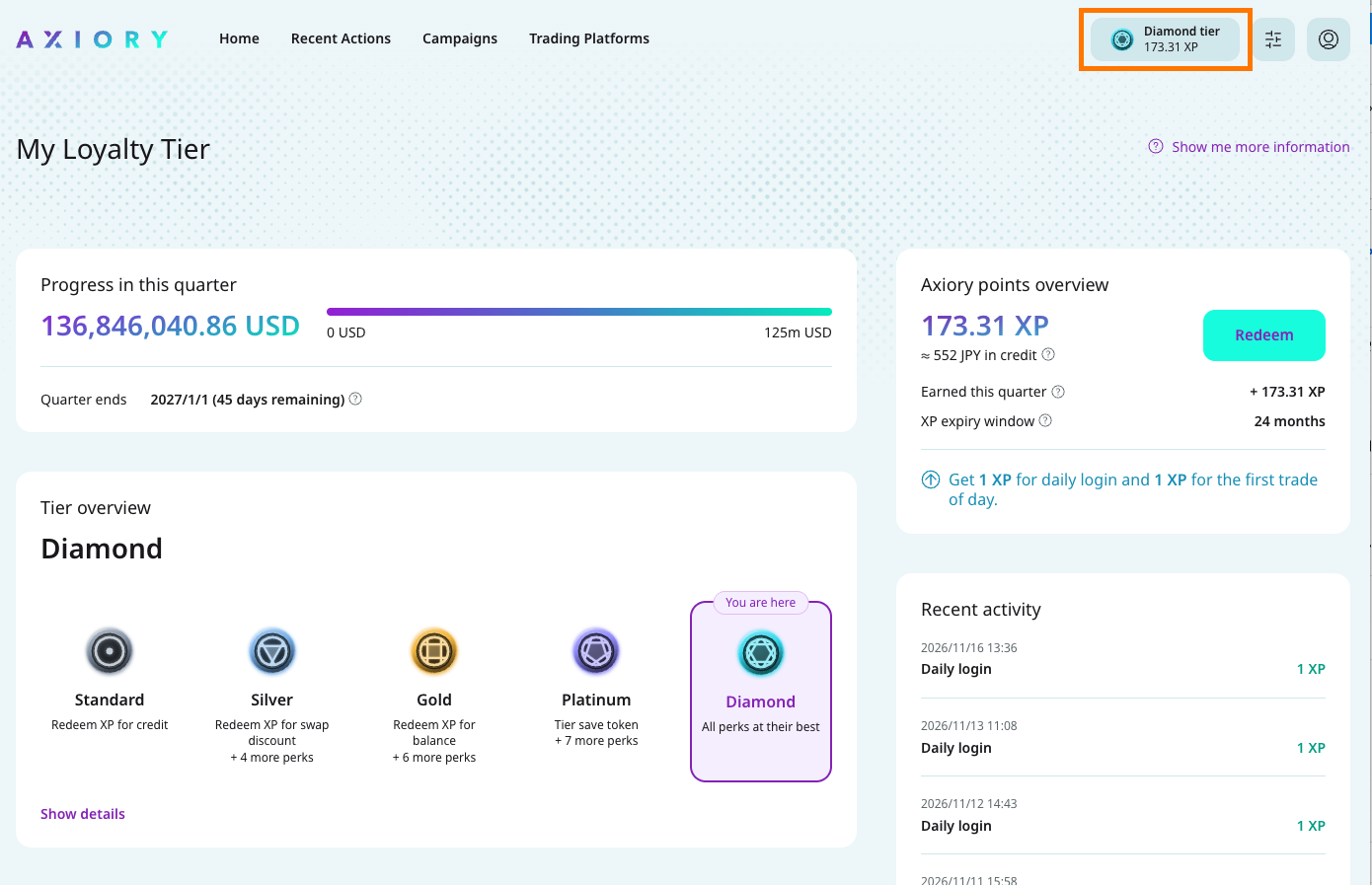
In your AXIORY client zone there is a loyalty page. Everything is on one screen.
Progress in this quarter — how much you have traded so far this quarter, shown as a bar. Below it, the exact amount you still need to trade to reach the next tier, and the date the quarter ends.
Tier ladder — all five tiers side by side, with your own tier marked. Each one shows its points rate and how many extra benefits it adds.
Momentum streak — how many months in a row you have kept your streak, your current bonus, and the amount you still need to trade this month to keep it.
Your points — your point balance, what it is worth in trading credit, how many points you earned this quarter, and when your points expire. There is a Redeem button here.
Recent points — a list of every point added or spent, with the date. Daily logins, trades, and exchanges all appear here, so you can always check where a number came from.
If you keep your pace — a chart estimating how your points would grow if you carry on trading as you do now.
Which products does it cover?
All of them. Every instrument we offer is included, Japanese yen pairs as well.
Who can take part?
Every AXIORY client. All account types are included.
Will you warn me before points expire?
Yes. You will be notified before your oldest points are due to expire, so you have time to use them.